
settings
SimpleMenu (The module —)
The SimpleMenu module for Drupal 6.x and 7.x offers a drop-down menu that inserts itself at the top of your browser window on your website.
The menu can be fixed1 or scroll with the page.
By default, SimpleMenu presents the Navigation menu in Drupal 6.x and the Management menu in Drupal 7.x. You can change the SimpleMenu settings to display a different menu and show it on another tag than the Body tag.
The following pages ...
- 1. At this time the fixed menu doesn't handle very long menus properly meaning that some menu items will not be accessible (disappear at the bottom of the page.)
To Do Screenshots
Screenshots
The following are screenshots demonstrating the capabilities of the To Do List module.
Screenshots are clickable to review the large version (scale 1:1).
To Do Items (output)
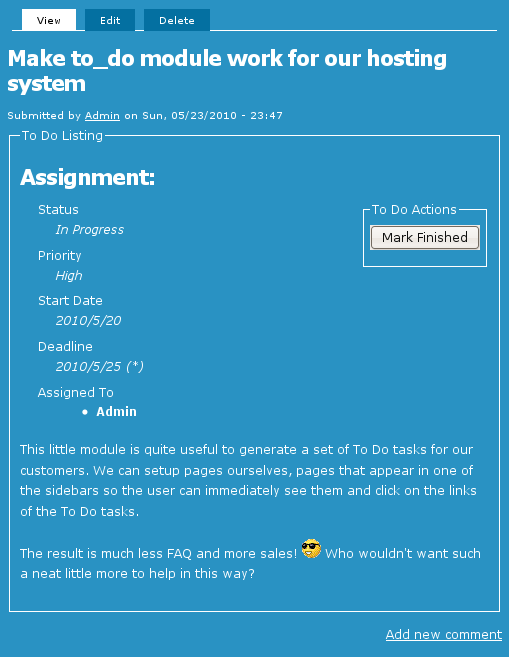
To Do List User Settings
My Account "To do list" tab
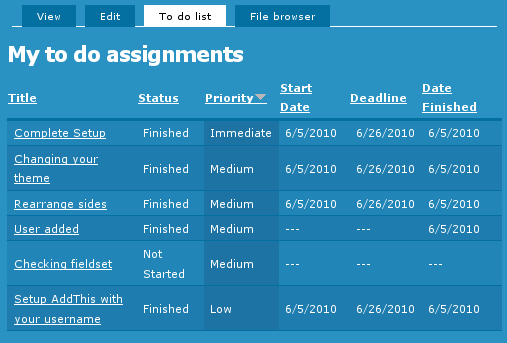 When To Do List is installed, users get a new tab in their My Account page.
To Do List Global Settings
Global Settings
Global settings are found under Administer » Site configuration » To do list (admin/settings/to_do).
Only To Do List administrators can edit the Global Settings.
To Do List Installation
Basic To Do List Installation
Install the module as usual, generally under your sites/all/modules folder. On a Unix command line, you can use the tar tool like this:
  cd sites/all/modules
  tar -xf to_do.tar.gz
Then go to Administer » Site building » Modules and enable the To do list module.
To Do List Permissions
Permissions
Once installed the module offers several permissions under Administer » User management » Permissions (admin/user/permissions). These are include permissions similar to the Node permissions and some others. All the permissions are explained below.
Additional permission granularity can be obtained with the use of other modules as defined in the Extend To Do List.
Version 1.3 and newer
Known issue
The permission functions properly, no issue in that regard. However, the name of the permissions should be using "to_do" with an underscore to be 100% compatible
To Do List Basic Module
Basics
The basic To Do List module has many parts and each is documented in a separate page.
To Do List Requirements
Requirements
The following are the requirements for the To Do List module.
To Do Items
The basic To Do List module offers you a new Node type and several User lists. There are no specific requirements for the main module to work other than Drupal Core.
Block
The Block module is mandatory, so in itself it is not a requirement.
In order to use the To Do List Block sub-module, you need the Core Block module.
How do I create a menu entry with Drupal?
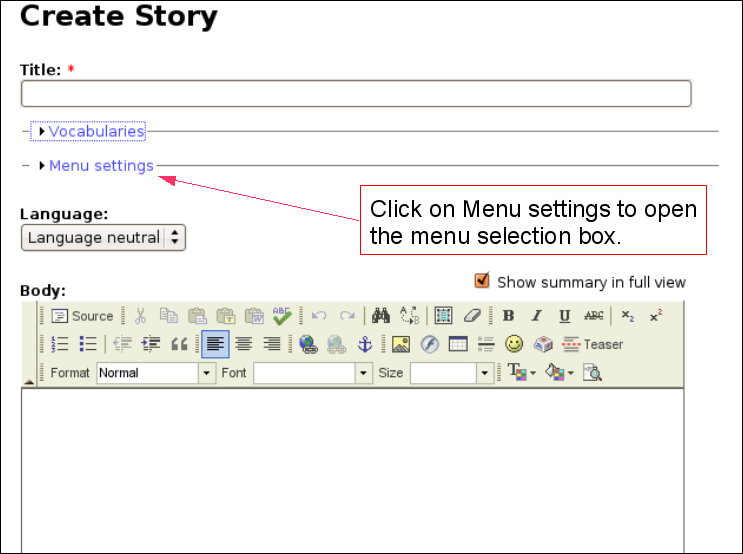 Pages and menus are separate modules in Drupal.
Discuss This! module Known Issues
The module works and is secure, however, there are problems difficult to circumvent. The following lists them. If you can help fixing some them, you'll be more than welcome!
Reordering the Comments on your Node
It is possible to reorder the node fields using the CCK module. If the Discuss This! comments do not appear exactly where you'd expect them to be, try using the the CCK module:
- Download the CCK module
- Install the CCK module
- Go to Administer » Content management » Content types
- Click on Manage content fields next to the node type you are ...
