
multiple
8 Things to Consider Before Choosing Payroll Software
Sat, 04/16/2022 - 14:30 — Alexis WilkeAre you in the process of purchasing payroll software for your business? Selecting the right one is not as easy as you may think, especially when you don’t know exactly what you’re looking for.
This article examines a few things you should know before selecting a software solution that meets your needs.

Docker, an advanced chroot utility
Fri, 11/29/2019 - 19:09 — Alexis Wilke
SECURITY WARNING
Before installing Docker and containers with services on your Linux system, make sure to read and understand the risks as mentioned on this Docker and iptables page. Especially, Docker will make all your containers visible to the entire world through your Internet connection. This is great if you want to indeed share that service with the rest of the world, it's very dangerous if you are working on that container service since it could have security issues that need patching and such. Docker documents a way to prevent that behavior by adding the following rule to your firewall:
iptables -I DOCKER-USER -i eth0 ! -s 192.168.1.0/24 -j DROP
This means that unless the IP address matches 192.168.1.0/24, the access is refused. The `eth0` interface name should be replaced with the interface name you use as the external ethernet connection. During development, you should always have such a rule.
That has not worked at all for me because my local network includes many other computers on my LAN and this rule blocks them all. So really not a useful idea.
Instead, I created my own entries based on some other characteristics. That includes the following lines in my firewall file:
*filter
:DOCKER-USER - [0:0]

-A DOCKER-USER -j early_forward
-A DOCKER-USER -i eno1 -p tcp -m conntrack --ctorigdstport 80 --ctdir ORIGINAL -j DROP
-A DOCKER-USER -i eno1 -p tcp -m conntrack --ctorigdstport 8080 --ctdir ORIGINAL -j DROP
-A DOCKER-USER -i eno1 -p tcp -m conntrack --ctorigdstport 8081 --ctdir ORIGINAL -j DROP
My early_forward allows my LAN to continue to work. These are my firewall rules that allow my LAN computers to have their traffic forwarded as expected.
Then I have three rules that block port 80, 8080, and 8081 from Docker.
Docker will add new rules that will appear after (albeit not within the DOCKER-USER list) and will open ports for whatever necessary service you install in your Dockers.
Note that the only ports you have to block are ports that Docker will share and that you have otherwise open on your main server. If Docker opens port 5000 and your firewall does not allow connections to port 5000 from the outside, then you're already safe. On my end I have Apache running so as a result I block quite usual HTTP ports from Docker.
Docker
As we are helping various customers, we encounter new technologies.
In the old days, we used chroot to create a separate environment where you could have your own installation and prevent the software from within that environment access to everything on your computer. This is particularly useful for publicly facing services liek Apache, Bind, etc.
Deleting a (Duplicate) Retweet from your Twitter Feed
Sat, 02/03/2018 - 17:30 — Alexis WilkeDouble Retweeting and How to Avoid Over-Duplication
I have seen many people retweeting like crazy and I've noticed that once in a while these people have been retweeting the exact same tweet more than once.
I'm pretty sure that in most cases these people ignore the fact. Personally I find their twitter feed annoying because of that. Retweeting is totally okay, it's sharing what others have tweeted and there is nothing wrong with it. However, seeing the exact same tweet 2, 3, 4, or even 5 times pretty much in a row is rather bad taste. I understand that this very tweet is super ...
CSS3 media queries
Sat, 01/14/2012 - 22:26 — Alexis WilkeCSS is improving with the introduction of CSS3.
Contrary to the previous version, CSS3 supports selections that are very advanced, offering capabilities close to what you could write in JavaScript.
Today I wanted to talk about the Media Queries because that can be used to very much optimize the list of links used to load your CSS data.
In HTML, you can use a <link ...> to add a CSS file to your page.
<link rel="stylesheet" type="text/css" href="style.css" />
In this case, the file style.css will always be loaded, whatever the media being used.
jsMath Security Issue
Security Issue
A security issue was found in all versions of jsMath before 2.x-dev for Drupal 6.x of Jul 29, 2010.
You may still securely use older versions of jsMath on private websites and websites were you are the only user (as in, the only one who can log in.)
The Drupal Security Advisory issue is here: https://www.drupal.org/node/854402
Other Problem
There is another problem: jsMath offers a JavaScript function that parses entire web pages (although there are ways to circumvent that problem, the module does not currently make use of those.) The jsMath Drupal module uses the ...
Table of Contents Settings
Filter Configuration
At this point, most of the Table of Contents configuration is done in the Table of Contents filter.
This means multiple Input formats allow you to make use of several different configurations.
SimpleMenu Known Issues
SimpleMenu Disappears
There following are a few of the main reasons why SimpleMenu disappears.
Pop-up Windows
By default, SimpleMenu wants to hide itself in pop-up windows. This is a feature.
The reason is that many websites will open pop-up windows for all kinds of extra-features such as uploading an image or printing some description of an image or the definition of a word or product.
These windows should not include the SimpleMenu bar.
There is a dedicated page giving several different ways to fix this problem on your website.
Menu Overflow
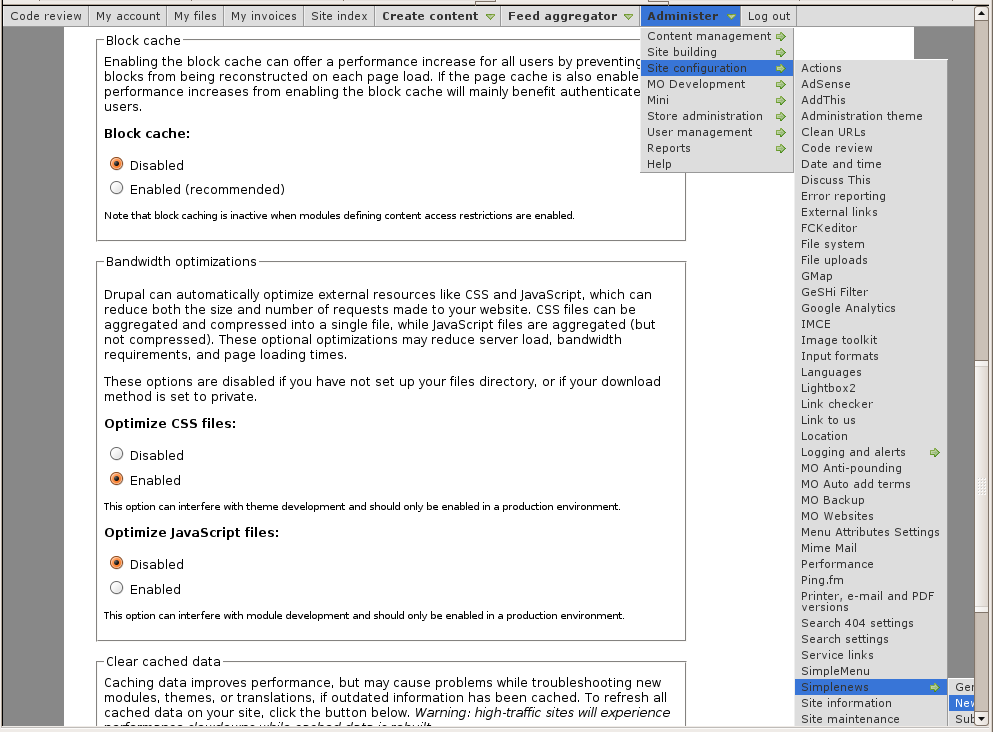 Very long menus will disappear on the
Help for To Do List End Users
Introduction
 This page documents the usage of the To Do List module to end users (i.e. not how to install and setup the module, but how to create To Do List items, share them, mark them started/finished, etc.)
For administrative information check out the To Do List module help.
How do I create a menu entry with Drupal?
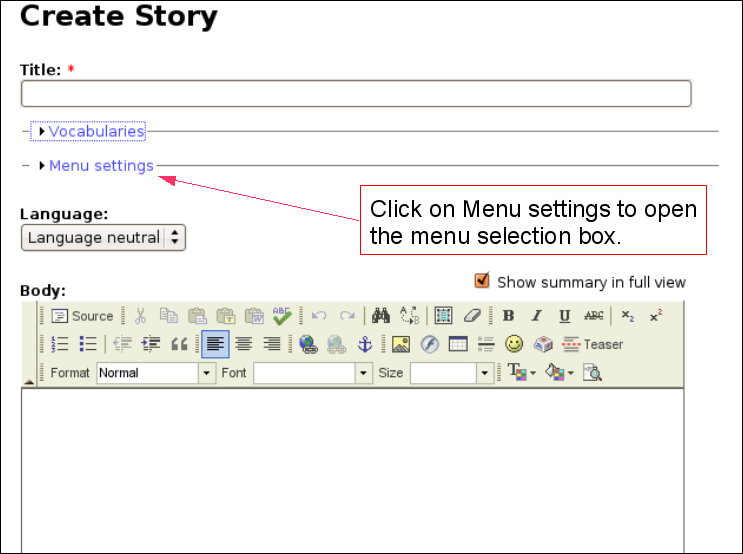 Pages and menus are separate modules in Drupal.
Discuss This! module Known Issues
The module works and is secure, however, there are problems difficult to circumvent. The following lists them. If you can help fixing some them, you'll be more than welcome!
Reordering the Comments on your Node
It is possible to reorder the node fields using the CCK module. If the Discuss This! comments do not appear exactly where you'd expect them to be, try using the the CCK module:
- Download the CCK module
- Install the CCK module
- Go to Administer » Content management » Content types
- Click on Manage content fields next to the node type you are ...
