
comment
MobileKey addition to ThemeKey
The main idea of MobileKey is to give you the capability to switch your website theme to a mobile specific theme when the user access your site from one's mobile phone. A mobile theme will make it easier to access your website on a mobile device.
For go to the ThemeKey settings page:
Administer » Site configuration » ThemeKey
The MobileKey adds one selection to the list of attributes to match. The new selection is called:
mobile:device
This works everywhere on your website (it is a global option, not specific to any kind of pages.) The system checks different parameters to
Drupal Aggregator
The default Aggregator Drupal module does not work very well. There are several problems with the Drupal Core module, one of which we have not fixed in our version (i.e. the flatness of the item table.)
There is a list of the known issues and our comments and whether we fixed the problem:
| Problem | Solution in m2osw's version of Aggregator |
|---|---|
| Missing XML marker | The <?xml ... ?> marker is missing from some RSS feeds, add it as required |
| Spurious data | Some RSS feeds add spurious data ... |
jsMath Security Issue
Security Issue
A security issue was found in all versions of jsMath before 2.x-dev for Drupal 6.x of Jul 29, 2010.
You may still securely use older versions of jsMath on private websites and websites were you are the only user (as in, the only one who can log in.)
The Drupal Security Advisory issue is here: https://www.drupal.org/node/854402
Other Problem
There is another problem: jsMath offers a JavaScript function that parses entire web pages (although there are ways to circumvent that problem, the module does not currently make use of those.) The jsMath Drupal module uses the ...
Table of Contents tags and parameters
Syntax
Supported Tags
The module supports 3 tags that all generate a Table of Contents.
The most popular is now [toc] since it is easy to type and works in WYSIWYG editors.
Table of Contents Settings
Filter Configuration
At this point, most of the Table of Contents configuration is done in the Table of Contents filter.
This means multiple Input formats allow you to make use of several different configurations.
SimpleMenu Known Issues
SimpleMenu Disappears
There following are a few of the main reasons why SimpleMenu disappears.
Pop-up Windows
By default, SimpleMenu wants to hide itself in pop-up windows. This is a feature.
The reason is that many websites will open pop-up windows for all kinds of extra-features such as uploading an image or printing some description of an image or the definition of a word or product.
These windows should not include the SimpleMenu bar.
There is a dedicated page giving several different ways to fix this problem on your website.
Menu Overflow
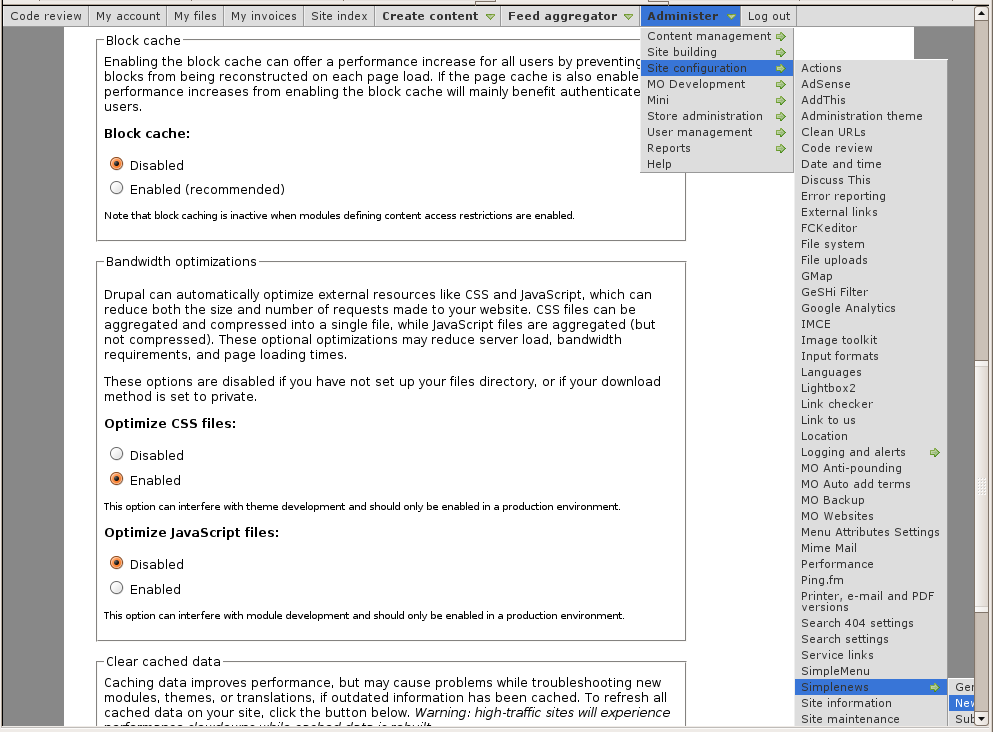 Very long menus will disappear on the
Discuss This! module Known Issues
The module works and is secure, however, there are problems difficult to circumvent. The following lists them. If you can help fixing some them, you'll be more than welcome!
Reordering the Comments on your Node
It is possible to reorder the node fields using the CCK module. If the Discuss This! comments do not appear exactly where you'd expect them to be, try using the the CCK module:
- Download the CCK module
- Install the CCK module
- Go to Administer » Content management » Content types
- Click on Manage content fields next to the node type you are ...
Discuss This! User Work Flow
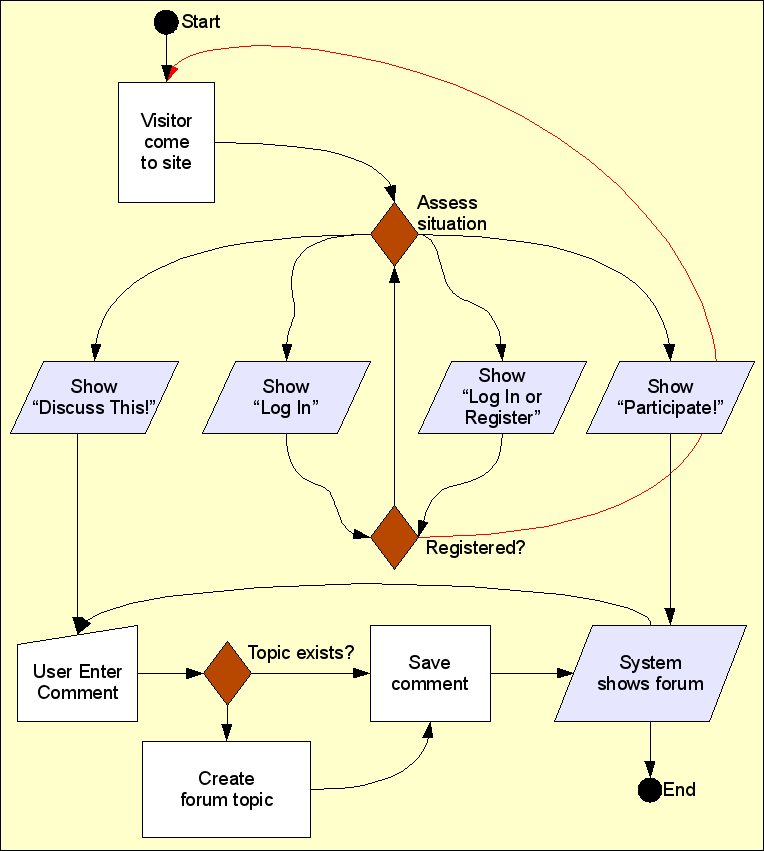 The Discuss This! module enables you to remove comments from a page, but still let people post comments about it. The page teaser will be used in a forum post and the valuable user comment attached to that forum.
Discuss This! (The Module —)
The following documentation is about the Discuss This! module.
The concept of the Discuss This! module is simple:
Let users comment your pages but force them to do so in your Forum.
Insert Node Parameter: repeat (6-1.2) [no content]
The repeat keyword is used to repeat the filtering on the data just inserted. This is particularly useful with the asterisk name or on nodes that do not otherwise include a format that transforms the tags included in themselves.
This let you create nodes that are like macros.
Note that the macro can itself include a repeat in one of its Insert Node tags.1
- 1. As far as I can tell, this will not create recursive calls, however, if you have a problem with a macro using repeat, try to remove the keyword to see if that solves the problem. If so, let me know by
