
map
Docker, an advanced chroot utility
Fri, 11/29/2019 - 19:09 — Alexis Wilke
SECURITY WARNING
Before installing Docker and containers with services on your Linux system, make sure to read and understand the risks as mentioned on this Docker and iptables page. Especially, Docker will make all your containers visible to the entire world through your Internet connection. This is great if you want to indeed share that service with the rest of the world, it's very dangerous if you are working on that container service since it could have security issues that need patching and such. Docker documents a way to prevent that behavior by adding the following rule to your firewall:
iptables -I DOCKER-USER -i eth0 ! -s 192.168.1.0/24 -j DROP
This means that unless the IP address matches 192.168.1.0/24, the access is refused. The `eth0` interface name should be replaced with the interface name you use as the external ethernet connection. During development, you should always have such a rule.
That has not worked at all for me because my local network includes many other computers on my LAN and this rule blocks them all. So really not a useful idea.
Instead, I created my own entries based on some other characteristics. That includes the following lines in my firewall file:
*filter
:DOCKER-USER - [0:0]

-A DOCKER-USER -j early_forward
-A DOCKER-USER -i eno1 -p tcp -m conntrack --ctorigdstport 80 --ctdir ORIGINAL -j DROP
-A DOCKER-USER -i eno1 -p tcp -m conntrack --ctorigdstport 8080 --ctdir ORIGINAL -j DROP
-A DOCKER-USER -i eno1 -p tcp -m conntrack --ctorigdstport 8081 --ctdir ORIGINAL -j DROP
My early_forward allows my LAN to continue to work. These are my firewall rules that allow my LAN computers to have their traffic forwarded as expected.
Then I have three rules that block port 80, 8080, and 8081 from Docker.
Docker will add new rules that will appear after (albeit not within the DOCKER-USER list) and will open ports for whatever necessary service you install in your Dockers.
Note that the only ports you have to block are ports that Docker will share and that you have otherwise open on your main server. If Docker opens port 5000 and your firewall does not allow connections to port 5000 from the outside, then you're already safe. On my end I have Apache running so as a result I block quite usual HTTP ports from Docker.
Docker
As we are helping various customers, we encounter new technologies.
In the old days, we used chroot to create a separate environment where you could have your own installation and prevent the software from within that environment access to everything on your computer. This is particularly useful for publicly facing services liek Apache, Bind, etc.
US Zip Code overlay on Google Maps
Wed, 01/16/2013 - 19:21 — Alexis Wilke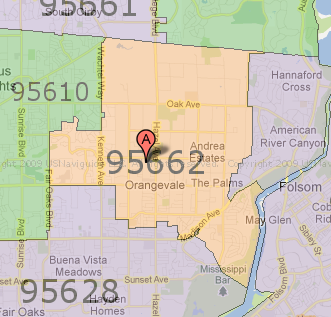
Today I had a need to find out a set of zip codes that would match a delivery area for one of my customers. I was wondering how could I find out all the zip codes over a given area...
Searching a little bit I found a website named zipmap which actually does just that. The entire US is covered and you can navigate it just like you navigate a regular Google Map view. Very practical!
You can easily move around, zoom in and out, and you even see the map with street names in the background.
DefineFont2
It is common to use the DefineFont2 tag in order to create an array of shapes later re-used to draw strings of text on the screen. This tag must be used whenever a DefineEditText references a font; and in that case it is suggested you include a full description of the font with layouts.
The array of glyphs must be ordered in ascending order (the smaller glyph number saved first; thus 'a' must be saved before 'b', etc.).
All the characters should be defined in a 1024x1024 square (in pixels) to be drawn with the best possible quality. This square is called the EM square.
The ...
SWF Any Filter (swf_any_filter)
A filter defines how to transform the objects it is attached to. The first byte is the filter type. The data following depend on the type. Because each filter is much different, they are defined in separate structures. You can attach a filter to an object using an ActionScript or the PlaceObject3 tag.
The following describes the different filters available since version 8.
Value Name Version 0 Drop Shadow 8 ...
DefineFontInfo
A DefineFontInfo tag will be used to complete the definition of a DefineFont tag. It uses the exact same identifier (f_font_info_id_ref = f_font_id). You must have the corresponding font definition appearing before the DefineFontInfo since it will use the number of glyphs defined in the DefineFont to know the size of the map definition in the DefineFontInfo tag.
When it looks like it perfectly matches an existing system font, the plugin may use that system font (as long as no rotation is used, it will work fine.) It is also possible to force the use of the system font by declaring an empty ...
DefineFont
It is common to use the DefineFont tag in order to create an array of shapes later re-used to draw strings of text on the screen. Note that the definition of the shape within a font is limited since it can't include any specific fill and/or line style. Also, each shape is assumed to be defined within a 1024x1024 square. This square is called the EM Square. Fig 1. below shows you the EM Square and how it is used. The characters baseline can be placed anywhere within the EM Square (it certainly can be outside too if you wish?!?).
A new concept: Throwaway Software.
Wed, 10/01/2008 - 10:53 — Alexis Wilke
More and more, people are learning new software as they go. A few will stick to one software for a long time simply because it is easier, but changing is easy too, especially if the new system is easy to use. But how do you produce throwaway software? And is it worth the trouble? As we see things evolving, more and more, people want to use software anywhere they go. This means software that runs on the Internet in some ways. For instance, you can use Google Map anywhere you go, as long as you have a computer to access the Internet.
