
disappear
Screensaver killing X11 with an NVidia GPU
Sat, 03/14/2026 - 15:10 — Alexis WilkeIn the last few months, I have had some problems with my desktop computer. It would enter the screensaver and not get out of the mode easily. I was able to get the screen video back by flipping through the monitor input ports (It has three: HDMI 1, HDMI 2 and DisplayPort).
Until a few days ago when the system decided to install a new version of the NVidia driver: v580.126.09. That first crashed the GPU and the output video was gone. I had to reboot the hard way (sudo init 0 took the system mostly down and then given that it did not turn off the computer, hit the power button for 5 seconds).
Getting Rid of Deactivated Facebook Friends
Thu, 12/21/2017 - 14:25 — Alexis WilkeLast updated in Dec 31, 2017 as many things have changed.
Not only that, I also noticed that "dead" accounts are not always really dead.
Read below to learn more.
I was slowly nearing 5,000 friends when all of a sudden I had 5,089!
Wondering what was happening, a post on the Blackhat World forum caught my eye as someone mentioned the fact that he had 5,700 friends. The answer was that deactivated friends do count against your 5,000 friends limit. They are counted as part of your friends even though they do not have an account anymore and they don't get automatically removed ...
Table of Contents tags and parameters
Syntax
Supported Tags
The module supports 3 tags that all generate a Table of Contents.
The most popular is now [toc] since it is easy to type and works in WYSIWYG editors.
To Do List Known Issues
Cannot Assign User to To Do List item
When you first install the module, I wouldn't be surprised if you'd want to create a To Do List item right away and then assign the task to one or more users.
It won't work.
Before users can be assigned a To Do List item, you must give them permission to be assigned to such an item. This is done in the usual permission place: Administer » User management » Permissions. You may also want to create a new role of people who deal with To Do List items.
Actually, the To Do List module comes with many permissions so you may want to ...
To Do Block
Installation
Go to Administer » Site building » Modules and click on To Do Block to install the Block extension for the To Do module.
SimpleMenu Known Issues
SimpleMenu Disappears
There following are a few of the main reasons why SimpleMenu disappears.
Pop-up Windows
By default, SimpleMenu wants to hide itself in pop-up windows. This is a feature.
The reason is that many websites will open pop-up windows for all kinds of extra-features such as uploading an image or printing some description of an image or the definition of a word or product.
These windows should not include the SimpleMenu bar.
There is a dedicated page giving several different ways to fix this problem on your website.
Menu Overflow
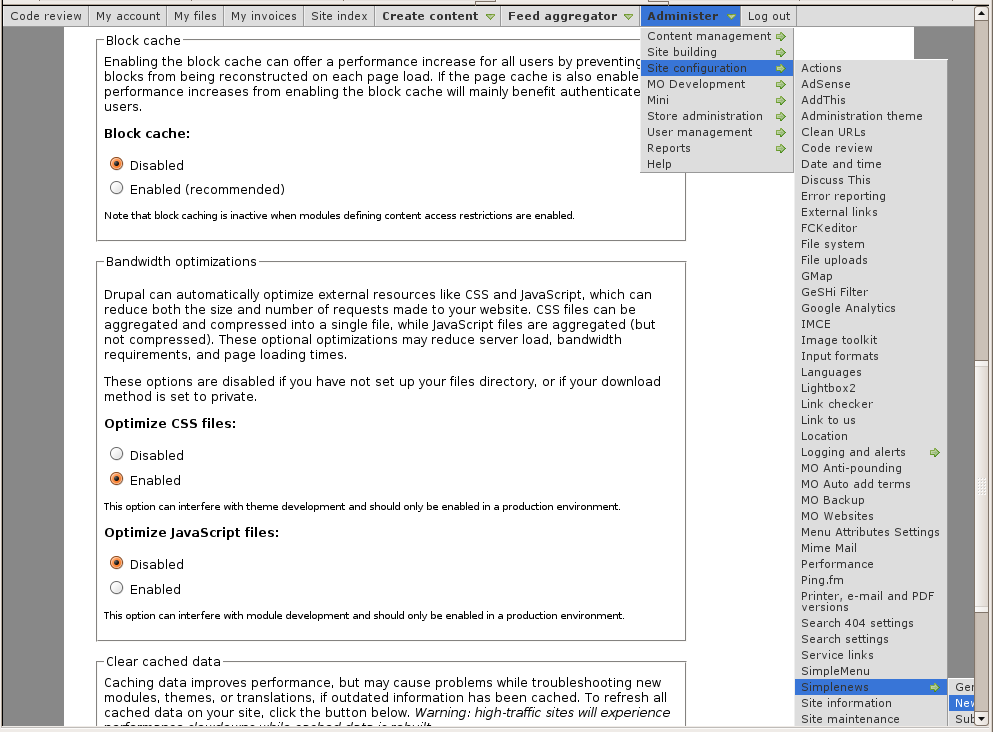 Very long menus will disappear on the
SimpleMenu (The module —)
The SimpleMenu module for Drupal 6.x and 7.x offers a drop-down menu that inserts itself at the top of your browser window on your website.
The menu can be fixed1 or scroll with the page.
By default, SimpleMenu presents the Navigation menu in Drupal 6.x and the Management menu in Drupal 7.x. You can change the SimpleMenu settings to display a different menu and show it on another tag than the Body tag.
The following pages ...
- 1. At this time the fixed menu doesn't handle very long menus properly meaning that some menu items will not be accessible (disappear at the bottom of the page.)
Help for To Do List End Users
Introduction
 This page documents the usage of the To Do List module to end users (i.e. not how to install and setup the module, but how to create To Do List items, share them, mark them started/finished, etc.)
For administrative information check out the To Do List module help.
The assert() macro in C/C++
Fri, 10/26/2007 - 22:06 — Alexis Wilke
This is a subject that comes back all the time in C/C++ boards.
Should you use assertions?
The answer is clearly yes. But the C/C++ assert() function is usually defined using a macro. Macros have several problems. The most common ones are: they offer no type checking, they do not warn you about weird side effects, they have a different syntax than the C/C++ language itself.
One good thing: for a fast program, the debug code used to check parameters, results, etc. is gone.
One really bad thing: if the expression in the macro has a side effect, the release program is different from ...
