
Blogger
Upgrade to Snap! Business


 Snap! Business. This is the best decision you could make.
Your business website is you online. Educate your leads by the writing of your journal, and offer quality pages full of information!
This upgrade enhances your existing Snap! Blogger Free website with business quality features such as remote blogging, anti-spam features, incorporated social media capabilities, professional analysis, and much
How do I add my Facebook badge to my Blogger page?
Wed, 04/14/2010 - 04:17 — Alexis WilkeWhen I created my blog on Blogger, I felt like it was a bit dry at first. So I looked into what to add in the column on the side... Since I like to make friends on Facebook, I thought that adding my badge would be a good idea.
It is quick to do and everyone can do it, really! So... first log in both Blogger and Facebook. In Facebook, go to your wall and click on Edit My Profile. The link is under your picture (and I hope you uploaded a photo! People want to see your face!!! Not your dog or your car.)
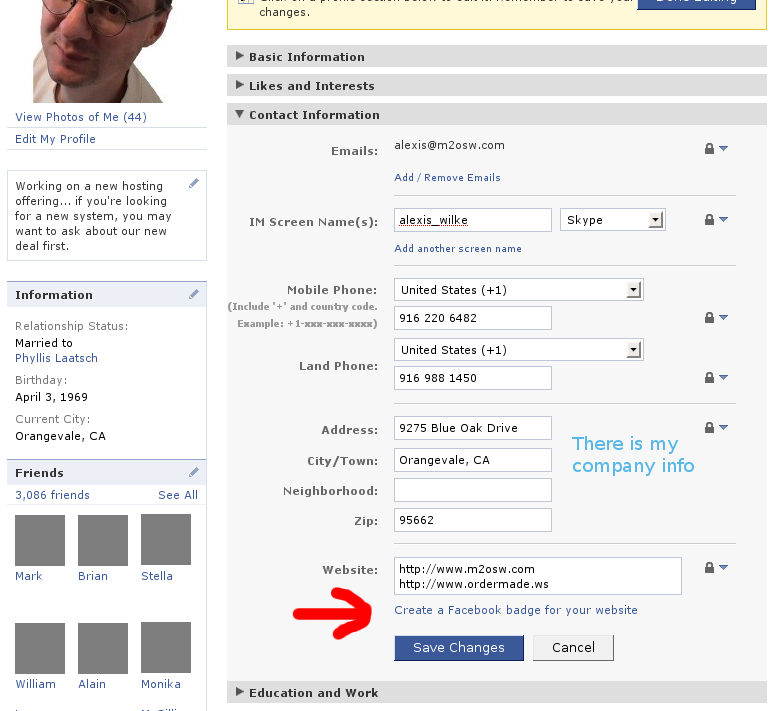
Once in your profile, click on the Contact Information bar. Then click on the ...
WordPress at Made to Order Software!
Fri, 10/19/2007 - 21:20 — Alexis WilkeWelcome on Alexis’ Blog at Made to Order Software Corporation.
This is my first blog! I’m glad I got WordPress to work with the m2osw style sheet. It is quite different from the default blogging board setup! Also I needed to make it work for several people on the same website without duplicating the code each time.
I did make changes to the code in order to achieve this feat. First, I had to access a specific database for each person to have its own blog (this may be just me who did not know how to use all the available features of WordPress, though.)
The following function ...
