
Windows
Screensaver killing X11 with an NVidia GPU
Sat, 03/14/2026 - 15:10 — Alexis WilkeIn the last few months, I have had some problems with my desktop computer. It would enter the screensaver and not get out of the mode easily. I was able to get the screen video back by flipping through the monitor input ports (It has three: HDMI 1, HDMI 2 and DisplayPort).
Until a few days ago when the system decided to install a new version of the NVidia driver: v580.126.09. That first crashed the GPU and the output video was gone. I had to reboot the hard way (sudo init 0 took the system mostly down and then given that it did not turn off the computer, hit the power button for 5 seconds).
No more excuses! Protect your passwords on your computer with strong encryption.
Wed, 02/14/2018 - 18:05 — Alexis WilkeMore and more, we hear talks about hackers entering personal accounts on systems such as Facebook, Twitter, Instagram and many others. There are many reasons why someone's account will be hacked. One of them is the lack of imagination for their password. Plus, some people use the same password for all of their accounts.
So, if you do it right, you will end up with many passwords. On my end, I have one password per account and that means about 400 passwords... That's totally unmanageable in a fairly standard human brain. For this reason, you end up writing down all your passwords on ...
Simplemenu Settings
Menu Settings
Menu
Select the menu to be displayed as the Simplemenu. By default, we display the Navigation Menu which makes the most sense for administrator (as the Simplemenu was primarily created for administrators wanting to quickly go to all administration pages.)
Theme
Select a theme to display your Simplemenu items and dropdowns. The default is called original.
The themes reside in the module sub-folder named themes. Each theme is defined in a specific directory named after the theme. That name is what appears in the dropdown in the settings.
It is possible to add new themes as
Drupal Aggregator
The default Aggregator Drupal module does not work very well. There are several problems with the Drupal Core module, one of which we have not fixed in our version (i.e. the flatness of the item table.)
There is a list of the known issues and our comments and whether we fixed the problem:
| Problem | Solution in m2osw's version of Aggregator |
|---|---|
| Missing XML marker | The <?xml ... ?> marker is missing from some RSS feeds, add it as required |
| Spurious data | Some RSS feeds add spurious data ... |
SimpleMenu Known Issues
SimpleMenu Disappears
There following are a few of the main reasons why SimpleMenu disappears.
Pop-up Windows
By default, SimpleMenu wants to hide itself in pop-up windows. This is a feature.
The reason is that many websites will open pop-up windows for all kinds of extra-features such as uploading an image or printing some description of an image or the definition of a word or product.
These windows should not include the SimpleMenu bar.
There is a dedicated page giving several different ways to fix this problem on your website.
Menu Overflow
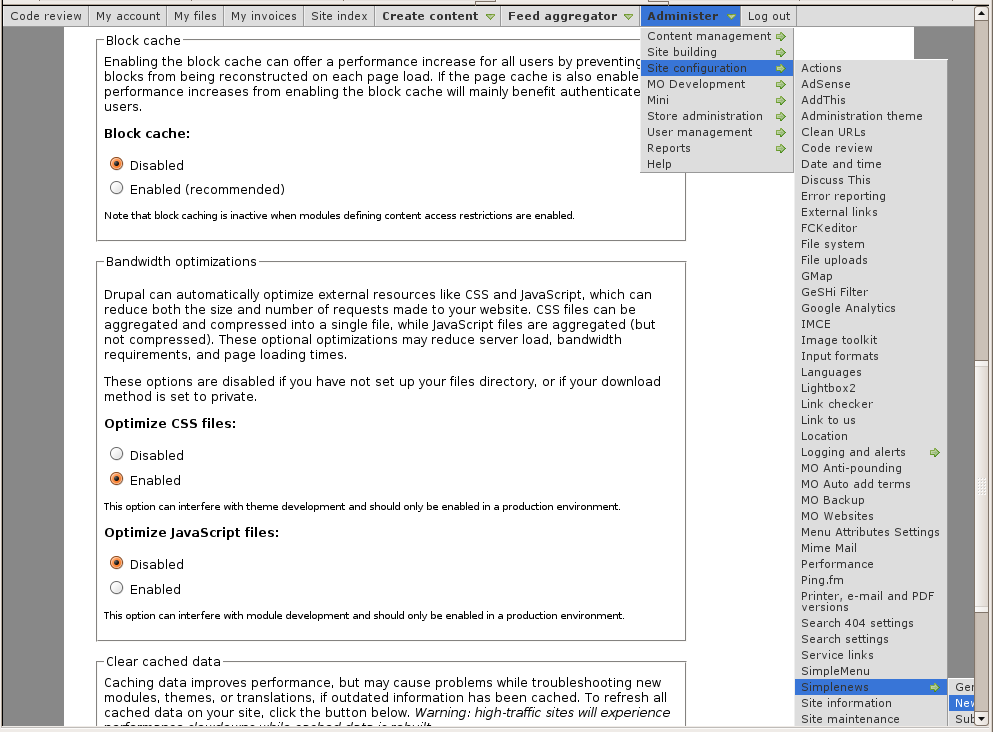 Very long menus will disappear on the
Handling of Pop-up Windows by SimpleMenu
Feature
By default, SimpleMenu is not shown on pop-up windows. There is a flag in the SimpleMenu settings that can be unchecked to avoid this side effect. The pop-up capability is often detected when you open a new tab from the current window. It will depend on the browser and the link being clicked1.
Quick Fix
When the menu is only used by the administrators, it is possible to simply open a new tab and copy and paste the URL from the existing window with the missing menu to the ...
- 1. We are trying to ameliorate the code, but it is not easy to make it work properly 100% of the time.
Snap! Websites
Some of our customers are using the Snap! Websites technology:
We also use it for our websites:
Your cell phone is hackable...
Fri, 07/31/2009 - 00:02 — Alexis WilkeThis is a quite interesting article which I thought I should share and keep a copy of!
Most of us, even if we can determine whether a piece of software (or hardware!) can be hacked, we just do not have the time to spend on testing each device we use to ensure that no hackers will be able to get it. We rely on the manufacturer to do that work for us.
This article shows that even though all manufacturers have protections, all are vulnerable! And that means your data is vulnerable on your cell phones... Hope this does not scare you too much!
Note by the way that those people who have plenty of ...
Turn Watcher™
 Turn Watcher™ is a Combat Initiative Tracker by Made to Order Software! Turn Watcher was created by gamers for gamers to help you run your combat rounds more smoothly and efficiently.
Turn Watcher keeps track of the combat order of each player character (PC) and monster involved in your encounters by tracking player and monster initiative order and current hit points so you don't have to!
Turn Watcher lets you make secret skill checks and will saves for player characters. It manages the PCs and monsters that have delayed or readied actions. And it handles automatic bleed out of dying PCs and monsters!
Made to Order Software releases Turn Watcher 1.4 and a new website!
Thu, 12/11/2008 - 01:00 — Doug BarbieriMade to Order Software is proud to announce the release of Turn Watcher version 1.4 and a brand new website!
Turn Watcher version 1.4 incorporates not only some much needed bug fixes (specifically the Stabilize function) but the addition of a brand new feature: Soft Columns.
Use Soft Columns to add, edit and remove rolls and information columns to each of your combatants. For example, you may remove the Spot/Listen columns and replace them with Perception. Add new rolls such as Move Silently and Persuasion. You may also add information-only columns such as Armor Class and Condition Track, ...
