
edit
PHP eFax requires "ssl://" on RedHat EL7 and Ubuntu
Mon, 10/15/2018 - 20:32 — Alexis WilkeWe found out today that RedHat LE7 requires the use of the "ssl://" protocol instead of the default "tls://". The error we are getting from PHP looks like this:
PHP Warning:  stream_socket_client(): SSL operation failed with code 1. OpenSSL Error messages:
error:1409442E:SSL routines:ssl3_read_bytes:tlsv1 alert protocol version in .../lib/http_request.php on line 294
PHP Warning:  stream_socket_client(): Failed to enable crypto in .../lib/http_request.php on line 294
PHP Warning: stream_socket_client(): unable to connect to tls://secure.efaxdeveloper.com:443 ...PHP e-Fax requires valid SSL certificates (failed with code 1)
Thu, 07/27/2017 - 15:19 — Alexis WilkeAs e-Fax is updating their systems further to be compliant with various security systems, some new problems may arise on your servers.
The main one is an SSL error that is quite unclear.
Warning: stream_socket_client(): SSL operation failed with code 1. OpenSSL Error messages: error:14090086:SSL routines:ssl3_get_server_certificate:certificate verify failed in /path-to-php-efax/http_request.php on line 294
As we can see, the error mentions a server certificate function and says it could not verify a certificate.
If your server is not 100% up to date with newest SSL versions or your web ...
Protected Node Rules Support
The following features are available only when installing the Rules extension of protected nodes. This extension requires the thrid party Rules extension for Drupal.
Protected Node Rules Conditions
When handling a Node, it is possible to check whether the node is currently protected or locked.
Protected Nodes
A node is said protected when the node was protected by a password using the Protected node module.
Whether the user can view that node is irrevelant in this case. Only the fact that the node requires a password to be viewed is what this condition checks.
Locked Nodes
A ...
Protected Node per Node Type Settings
Node Type extension
The Protected Node module adds a field set to the Node Type form that you edit under:
Administer » Content management » Content types
These additions are explained in detail below.
The main reason for adding this feature is to avoid seeing the field set on all the node edit forms. With this feature you can hide the form on all the node types that you will never protect with a password.
Protected mode for nodes of this type
This option let you choose how this node type handles the Protected Node capability.
Never protected
This means this node ...
Protected Node Password Field set
Once installed and properly configured, the Protected node module adds a field set in the node edit form (assuming the user has the corresponding permission: "edit any password" or "edit password <node type>".)
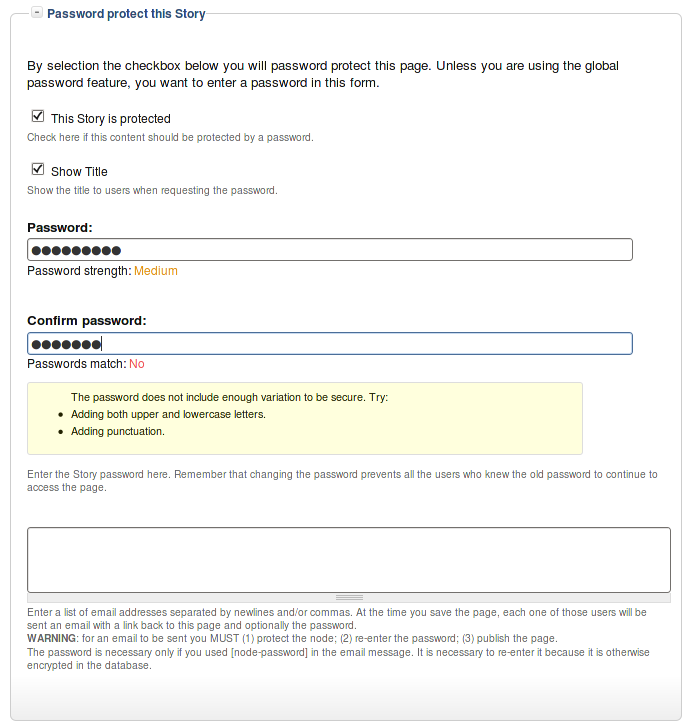 This field set includes two flags, a password, and emails (optional.)
By default, the field set is closed unless you selected protected by default. Whether the field set should be opened or closed can selected in the node type settings.
The <node type> is protected
The first check box is used to password
Protected Node Permissions
The Protected Node module adds permissions to define who has the right to make use of the password feature.
- access protected content
This is the basic access permission for users. Users who are given this permission can access a protected node as usual, except that they need to enter the password to handle the node.
This is true whether they want to view, edit, delete the node.
- bypass password protection
Users with the bypass permission can access all nodes that are protected without having to enter the passwords. This is very handy for website administrators and
Protected Node Installation
The basics of the Protected Node installation are easy:
- Get one of the tarball from Drupal.org
- Extract the files under sites/all/modules or some other modules folder
- Go to Administer » Site building » Modules and install the module (package Access)
- As the administrator (UID = 1) you are done.
Once you have installed the module, you probably want to change the permissions. Permissions allow your users to access the Protected Node functionality based on their roles. Please, see the point about Permissions for more information about those.
Now, you're ready ...
Drupal Aggregator
The default Aggregator Drupal module does not work very well. There are several problems with the Drupal Core module, one of which we have not fixed in our version (i.e. the flatness of the item table.)
There is a list of the known issues and our comments and whether we fixed the problem:
| Problem | Solution in m2osw's version of Aggregator |
|---|---|
| Missing XML marker | The <?xml ... ?> marker is missing from some RSS feeds, add it as required |
| Spurious data | Some RSS feeds add spurious data ... |
gVim editor in SeaMonkey and FireFox
Mon, 01/03/2011 - 00:20 — Alexis WilkeToday I discovered It's All Text. This was a FireFox (also works in SeaMonkey) extension that gives you the capability of editing a box of text in your favorite editor.
I love to use SeaMonkey, but the text editor is a bit light when it comes to writing code or fix broken HTML. To palliate to this problem, I often copy and paste the content of my posts from SeaMonkey to gVim, my favorite editor, apply the fixes lightning fast, and then copy the result back in SeaMonkey before saving.
This is a rather tedious process and prone to mistakes. To avoid problems, you can instead install ...
jsMath Installation
Requirements
In order to use the jsMath for displaying mathematics with TeX Drupal 6.x module you need:
- The actual jsmath Drupal module
- The jsMath library
