
documentation
The set_fax_id() function PHP e-Fax must be given unique IDs, each time.
Wed, 11/01/2017 - 14:35 — Alexis Wilke
The PHP eFax system uses a class that ease the communication between your software and eFax. The developer system is not too complicated, but there are tricks to it and the class hides most of them.
Today a customer contacted us as they just purchased a copy of our PHP library and had problems sending faxes. The fact is that they used the set_fax_id() function with a hard coded string. Imagine doing something like:
$efax->set_fax_id("Test Fax");
This looks pretty good, only after the second time the sending of the fax will fail because eFax considers that it was already ...
PHP e-Fax requires valid SSL certificates (failed with code 1)
Thu, 07/27/2017 - 15:19 — Alexis WilkeAs e-Fax is updating their systems further to be compliant with various security systems, some new problems may arise on your servers.
The main one is an SSL error that is quite unclear.
Warning: stream_socket_client(): SSL operation failed with code 1. OpenSSL Error messages: error:14090086:SSL routines:ssl3_get_server_certificate:certificate verify failed in /path-to-php-efax/http_request.php on line 294
As we can see, the error mentions a server certificate function and says it could not verify a certificate.
If your server is not 100% up to date with newest SSL versions or your web ...
Insert Node Parameter: target (6-1.4) [no content]
Add a window target in a link. For example
[node:123 target=_blank; link]
This option only applies to links and defines the target attribute of those links, as created with:
Insert Node Parameter: title (6-1.1),
Insert Node Parameter: link (5-1.0), or
Insert Node Parameter: more (6-1.1).
Using the target option by itself resets the Insert Node module to the default behavior (i.e. no target attribute):
[node:123 target=_blank; link target more]
The title link will have target="_blank" and the more link will not.
Note that this data is ...
MobileKey Installation
Get the tarball or the zip file of the module from Drupal.org (MobileKey on Drupal).
Go to one of you module folders and extract the file you downloaded.
The default installation folder is sites/all/modules, if you have a multi-site installation and want the module for just a few sites, go to sites/<sitename>/modules instead (create the modules folder if it doesn't exist yet.) It is recommended that you do not install under the top modules folder as this one is reserved for Drupal Core modules.
At that point, go to your Drupal website and go to Administer » Site building ...
Protected Node Installation
The basics of the Protected Node installation are easy:
- Get one of the tarball from Drupal.org
- Extract the files under sites/all/modules or some other modules folder
- Go to Administer » Site building » Modules and install the module (package Access)
- As the administrator (UID = 1) you are done.
Once you have installed the module, you probably want to change the permissions. Permissions allow your users to access the Protected Node functionality based on their roles. Please, see the point about Permissions for more information about those.
Now, you're ready ...
Protected Node (The Drupal module —)
The Protected Node module is used on websites where some pages need to be password protected. This is different from asking someone to create an account and often seen as much more user friendly, although in terms of protection it is quite similar.
If you've seen photo websites where you can go to an album but have to enter a password to see the photos, that's one example how this module can be used.
The module adds a field set in the node form to let authors enter a password.
The module has many options that are rather tricky to use so this documentation tries to explain what you can do
Table of Contents tags and parameters
Syntax
Supported Tags
The module supports 3 tags that all generate a Table of Contents.
The most popular is now [toc] since it is easy to type and works in WYSIWYG editors.
Table of Contents Settings
Filter Configuration
At this point, most of the Table of Contents configuration is done in the Table of Contents filter.
This means multiple Input formats allow you to make use of several different configurations.
Table of Contents Known Issues
Various known issues with the Table of Contents module.
Teaser appear, FCKeditor accentuated letters, Back to top arrow, Filters interaction (JavaScript removal,) headers numbering, double numbering...
SimpleMenu Known Issues
SimpleMenu Disappears
There following are a few of the main reasons why SimpleMenu disappears.
Pop-up Windows
By default, SimpleMenu wants to hide itself in pop-up windows. This is a feature.
The reason is that many websites will open pop-up windows for all kinds of extra-features such as uploading an image or printing some description of an image or the definition of a word or product.
These windows should not include the SimpleMenu bar.
There is a dedicated page giving several different ways to fix this problem on your website.
Menu Overflow
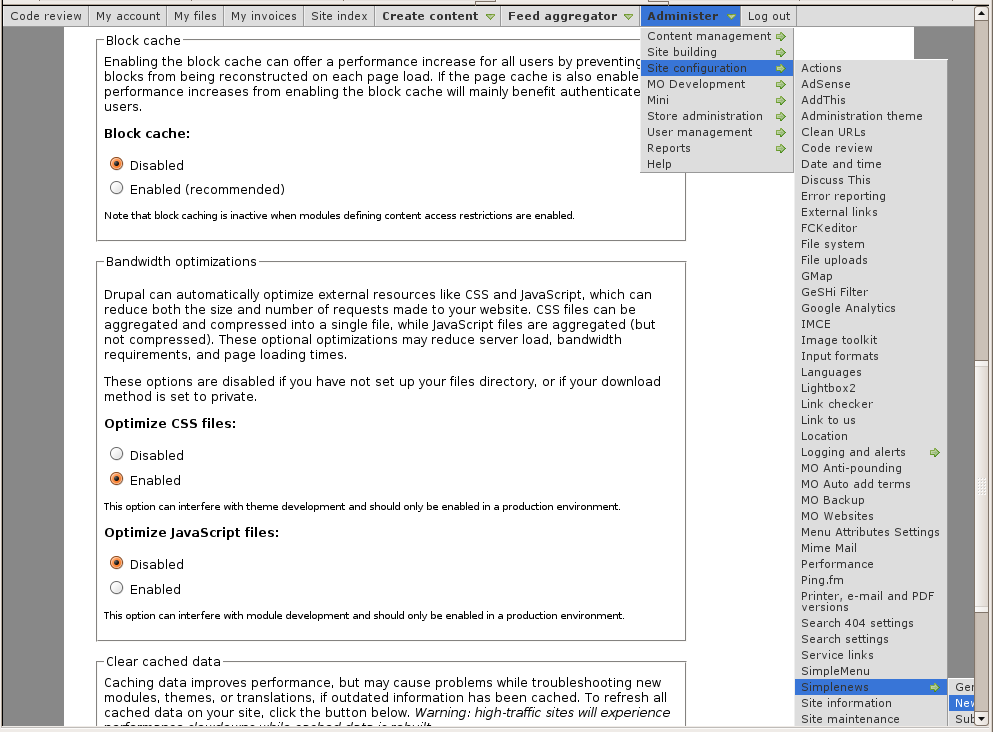 Very long menus will disappear on the
