
term
3 Efficient Ways to Store Data Long Term
Tue, 01/17/2023 - 19:13 — Alexis Wilke The digital landscape is changing every day. That means that businesses, organizations, and personal information need constant care and attention to maintain their safety, especially if it's data that needs to be kept an eye on for a long time. From being reliable, affordable, and as secure as possible, it's critical that it remains in the right hands.
This is why we've compiled a list of 3 efficient ways to store data long-term, including using off-site cloud storage plus taking advantage of SQL Server Data Tools. Ready to give your info the safety it deserves? Read on…
Protected Node Rules Support
The following features are available only when installing the Rules extension of protected nodes. This extension requires the thrid party Rules extension for Drupal.
Protected Node Rules Conditions
When handling a Node, it is possible to check whether the node is currently protected or locked.
Protected Nodes
A node is said protected when the node was protected by a password using the Protected node module.
Whether the user can view that node is irrevelant in this case. Only the fact that the node requires a password to be viewed is what this condition checks.
Locked Nodes
A ...
Protected Node Permissions
The Protected Node module adds permissions to define who has the right to make use of the password feature.
- access protected content
This is the basic access permission for users. Users who are given this permission can access a protected node as usual, except that they need to enter the password to handle the node.
This is true whether they want to view, edit, delete the node.
- bypass password protection
Users with the bypass permission can access all nodes that are protected without having to enter the passwords. This is very handy for website administrators and
Using the Taxonomy VTN View feature
One of the options to link terms in a vocabulary to their view is:
taxonomy_view/voc-xxx/term-xxx
This option sends you to that path, exactly (where voc-xxx and term-xxx are numbers representing the vocabulary identifier and term identifier respectively.)
As is, it will tell you that the page does not exist. This is because the taxonomy_view path is to be created with the View module. To create a taxonomy VTN view, you want to define two arguments:
- Vocabulary, and
- Term.
The result is a list of nodes that you can control with very high granularity, sort the way you want them ...
Parent/Child with Taxonomy VTN
Terms in a taxonomy can be organized as children of other terms. This generates a parent/child organization. For instance, you can have a term Fruit and mark Apple and Peach as children of Fruit.
The parent/child relationship can be used when you organize your Taxonomy VTN to shorten each page of your dictionary. The idea is simple: whenever you enter the top dictionary (taxonomy) page, you only get a list of the root terms (terms that are not children of other terms.) That list gives you access to the children terms and/or nodes of the parent term.
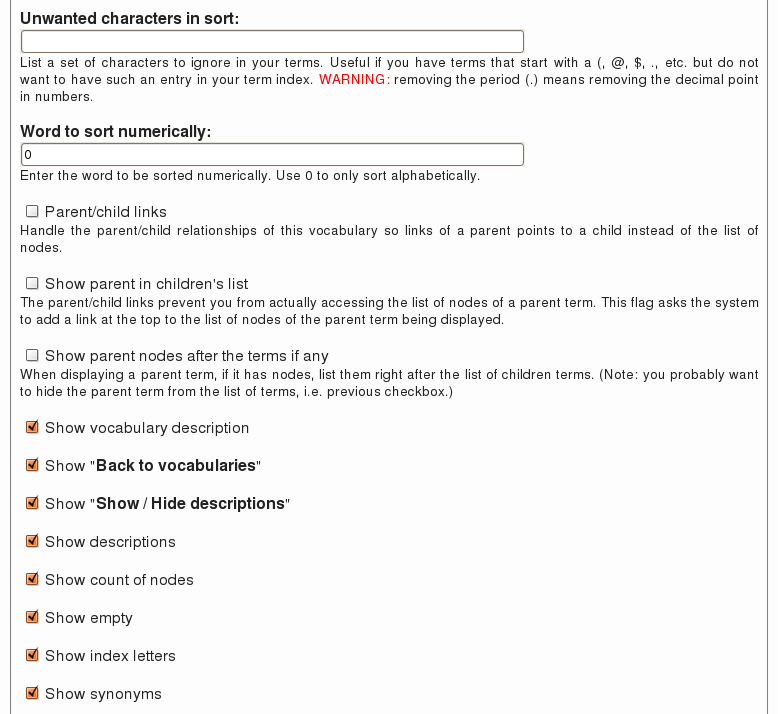 There are three flags you can use to
Terms & Conditions
Terms and Conditions for the Online Services
offered by Made to Order Software Corporation
This Agreement ("Agreement") is by and between Made to Order Software Corporation ("m2osw") a Californian Corporation and You, your heirs, your agents, successors and assigns ("You" and "Your"), and is made effective as of the date of electronic execution, which is when you register for an electronic account to use the Web site of m2osw. This Agreement sets forth the terms and conditions of Your use of the Online Services ...
Support
Support at Made to Order Software
Made to Order Software offers support for all of its products.
For our consumer products, please review your options on the corresponding consumer product page.
Made to Order Software Consults with Volcano
Tue, 06/06/2006 - 00:00 — Doug BarbieriMade to Order Software Corporation has just accepted a long term contract with Volcano Corporation, a $103 million company based in Rancho Cordova, California.
Volcano builds complex medical systems used to image venous canals using catheters. It helps save lives by making sure doctors use stents only when required. Made to Order Software is proud to help Volcano reach its goals with their embedded software systems.
Made to Order Software value added includes high quality technical documentation approved by the Food and Drug Administration (FDA) in the USA and similar agencies in Japan and ...
