
save
3 Efficient Ways to Store Data Long Term
Tue, 01/17/2023 - 19:13 — Alexis Wilke The digital landscape is changing every day. That means that businesses, organizations, and personal information need constant care and attention to maintain their safety, especially if it's data that needs to be kept an eye on for a long time. From being reliable, affordable, and as secure as possible, it's critical that it remains in the right hands.
This is why we've compiled a list of 3 efficient ways to store data long-term, including using off-site cloud storage plus taking advantage of SQL Server Data Tools. Ready to give your info the safety it deserves? Read on…
What is a Golden File in software development?
Mon, 03/14/2022 - 12:34 — Alexis Wilke While programming, one of the best thing to do to make sure that your software works as expected is to write tests.
Actually, if you write enough tests to make sure that the code works as expected, it should take you between two and three more time to finish up your project. So if it takes you one day to write a function, it will take you another two days to write good tests for that one function.
Many of those tests, especially as you construct more and more complex software, require large amount of input and output data. It's easy enough to test a function such as strlen(). It has one ...
3 Types of Software Every Business Needs
Fri, 01/28/2022 - 19:17 — Alexis WilkeAre you struggling to stay on top of everything in your business?
You don't need to handle everything all alone — there's software specifically designed to help your business thrive without you having to put in more hours. The right software will save you time by keeping everything organized and ready to go.
Learn about the 3 types of software to keep your business running as it should while you focus on more important things.

What Type of Business Do You Have?
As we go through each type, understand that the software your business needs depends mainly ...
HP Color LaserJet Pro Multifunction M479fdn Laser Printer
Tue, 05/12/2020 - 18:25 — Alexis Wilke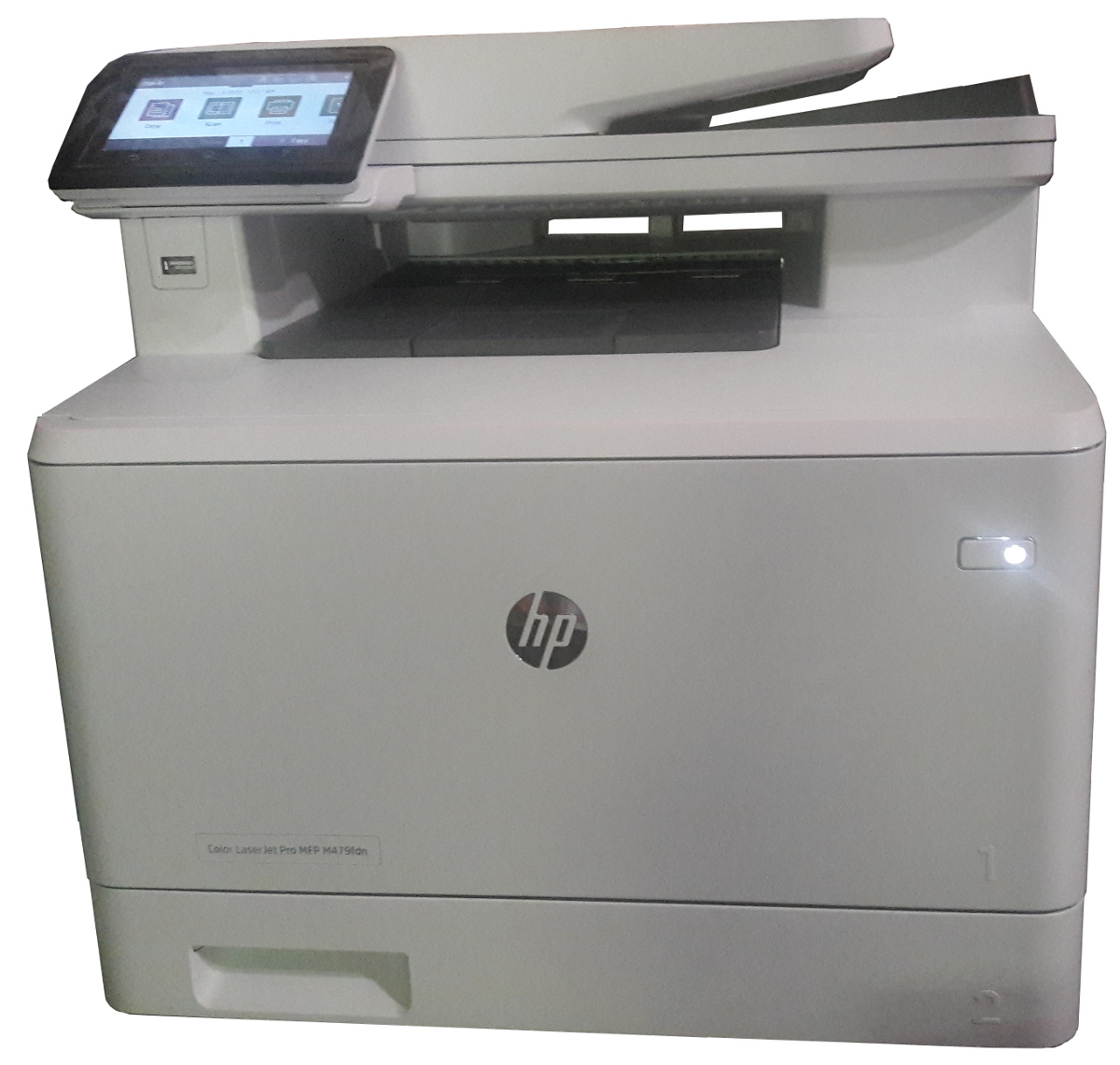
Click to get this printer on Amazon.com where I'm an affiliate.
Not too long ago, I ordered a new color drump for my old printer and replaced it. Not very long after that the print simply decided to not print at all anymore. Literally, it would pass the page through just fine but it had nothing on the page. I know it was working since it was printin g just fine the day before and there was still plenty of black ink (it would have had the light on if the black was not enough.)
I'm thinking that may have been a ploy by the manufacturer to push me to buy a new printer...
In any event, ...
Safely Processing a Queue of Jobs
Tue, 02/18/2020 - 10:29 — Alexis WilkeWhat is a Queue
In software a queue is a container which is used to add items on one side and remove them on the other in a very efficient manner.
Sorted Queues
When used by a Journal, a queue is often going to support some kind of sorted order. Some jobs are more important than others and these should be built sooner. In other words, we give those jobs a higher priority and we sort the queue by priority first then using the time at which the job gets inserted.
Note that the C++ std::queue and std::unque containers do not offer anyway to support a priority. Instead you have to use ...
Docker, an advanced chroot utility
Fri, 11/29/2019 - 19:09 — Alexis Wilke
SECURITY WARNING
Before installing Docker and containers with services on your Linux system, make sure to read and understand the risks as mentioned on this Docker and iptables page. Especially, Docker will make all your containers visible to the entire world through your Internet connection. This is great if you want to indeed share that service with the rest of the world, it's very dangerous if you are working on that container service since it could have security issues that need patching and such. Docker documents a way to prevent that behavior by adding the following rule to your firewall:
iptables -I DOCKER-USER -i eth0 ! -s 192.168.1.0/24 -j DROP
This means that unless the IP address matches 192.168.1.0/24, the access is refused. The `eth0` interface name should be replaced with the interface name you use as the external ethernet connection. During development, you should always have such a rule.
That has not worked at all for me because my local network includes many other computers on my LAN and this rule blocks them all. So really not a useful idea.
Instead, I created my own entries based on some other characteristics. That includes the following lines in my firewall file:
*filter
:DOCKER-USER - [0:0]

-A DOCKER-USER -j early_forward
-A DOCKER-USER -i eno1 -p tcp -m conntrack --ctorigdstport 80 --ctdir ORIGINAL -j DROP
-A DOCKER-USER -i eno1 -p tcp -m conntrack --ctorigdstport 8080 --ctdir ORIGINAL -j DROP
-A DOCKER-USER -i eno1 -p tcp -m conntrack --ctorigdstport 8081 --ctdir ORIGINAL -j DROP
My early_forward allows my LAN to continue to work. These are my firewall rules that allow my LAN computers to have their traffic forwarded as expected.
Then I have three rules that block port 80, 8080, and 8081 from Docker.
Docker will add new rules that will appear after (albeit not within the DOCKER-USER list) and will open ports for whatever necessary service you install in your Dockers.
Note that the only ports you have to block are ports that Docker will share and that you have otherwise open on your main server. If Docker opens port 5000 and your firewall does not allow connections to port 5000 from the outside, then you're already safe. On my end I have Apache running so as a result I block quite usual HTTP ports from Docker.
Docker
As we are helping various customers, we encounter new technologies.
In the old days, we used chroot to create a separate environment where you could have your own installation and prevent the software from within that environment access to everything on your computer. This is particularly useful for publicly facing services liek Apache, Bind, etc.
No more excuses! Protect your passwords on your computer with strong encryption.
Wed, 02/14/2018 - 18:05 — Alexis WilkeMore and more, we hear talks about hackers entering personal accounts on systems such as Facebook, Twitter, Instagram and many others. There are many reasons why someone's account will be hacked. One of them is the lack of imagination for their password. Plus, some people use the same password for all of their accounts.
So, if you do it right, you will end up with many passwords. On my end, I have one password per account and that means about 400 passwords... That's totally unmanageable in a fairly standard human brain. For this reason, you end up writing down all your passwords on ...
Getting Rid of Deactivated Facebook Friends
Thu, 12/21/2017 - 14:25 — Alexis WilkeLast updated in Dec 31, 2017 as many things have changed.
Not only that, I also noticed that "dead" accounts are not always really dead.
Read below to learn more.
I was slowly nearing 5,000 friends when all of a sudden I had 5,089!
Wondering what was happening, a post on the Blackhat World forum caught my eye as someone mentioned the fact that he had 5,700 friends. The answer was that deactivated friends do count against your 5,000 friends limit. They are counted as part of your friends even though they do not have an account anymore and they don't get automatically removed ...
MobileKey Installation
Get the tarball or the zip file of the module from Drupal.org (MobileKey on Drupal).
Go to one of you module folders and extract the file you downloaded.
The default installation folder is sites/all/modules, if you have a multi-site installation and want the module for just a few sites, go to sites/<sitename>/modules instead (create the modules folder if it doesn't exist yet.) It is recommended that you do not install under the top modules folder as this one is reserved for Drupal Core modules.
At that point, go to your Drupal website and go to Administer » Site building ...
Protected Node Global Settings
The protected node module has global settings found under:
Administer » Site configuration » Protected node
Protected node Statistics
The page starts with statistics to let you know how pages are protected on your website. All the counts include published and unpublished content.
- Total nodes — the total number of nodes on your website
- Unprotected nodes — number of nodes that do not have a password
-
Protected nodes — number of nodes that are current protected by a password
- Showing title — number of nodes showing their ...
