
blog
Ten Ways To Choose The Right Data Management Tool for Your Needs
Tue, 02/14/2023 - 16:04 — Alexis Wilke
Tools for data management are crucial parts of every organization. With the correct tool, you can efficiently and rapidly manage, store, analyze, and use your data in ways that provide valuable insights. But how can you choose the best data management system for your needs when there are so many options on the market today?
This blog post will offer ten suggestions to assist you in selecting the ideal data management technology for your company.
1. Recognize The Various Tools That Are Available
Data management products come in many different varieties nowadays, each with special ...
How do I add my Facebook badge to my Blogger page?
Wed, 04/14/2010 - 04:17 — Alexis WilkeWhen I created my blog on Blogger, I felt like it was a bit dry at first. So I looked into what to add in the column on the side... Since I like to make friends on Facebook, I thought that adding my badge would be a good idea.
It is quick to do and everyone can do it, really! So... first log in both Blogger and Facebook. In Facebook, go to your wall and click on Edit My Profile. The link is under your picture (and I hope you uploaded a photo! People want to see your face!!! Not your dog or your car.)
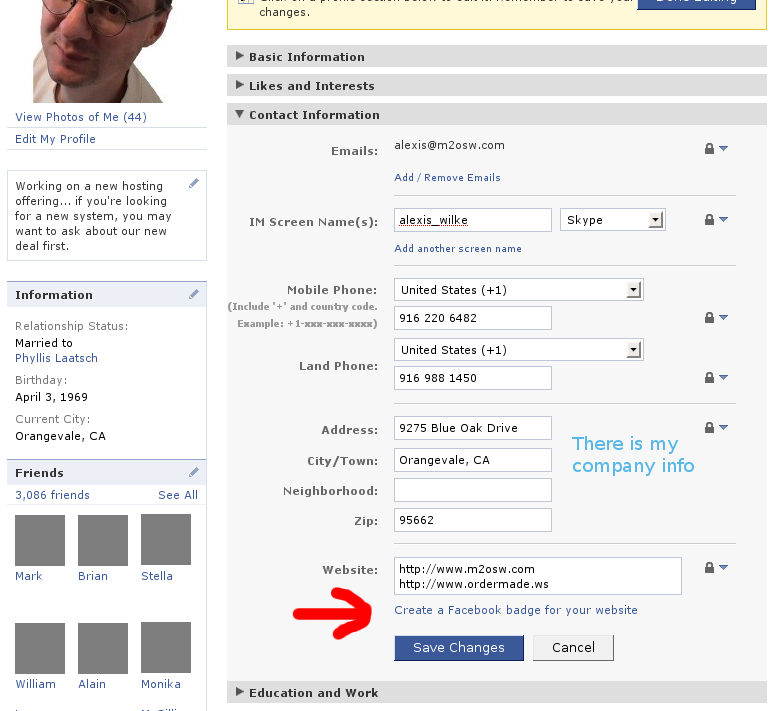
Once in your profile, click on the Contact Information bar. Then click on the ...
AJAX, CSS, HTML, XML, SOAP, LAMP… and now Web 2.0?
Wed, 07/30/2008 - 23:25 — Alexis Wilke
Dear reader,
Yes. With all these terms, it is quite easy to get lost.
As a developer, my skills are quite extensive. I started with Logo, learned assembly language, BASIC, C, C++… and all these other languages in between, those that most people pass by such as Ada, Eiffel, Icon… And the languages you kind of have to learn because you’re in it: Bourne Shell, configuration files for 100 different software, Makefile, etc.
And once you know all of these languages, you think you’re done. Well… Not quite!
The web has got it’s own set of languages! It
Really… What is a goal?
Wed, 03/26/2008 - 17:06 — Alexis WilkeI’m writing this blog after meeting with a few people with great experience at the NCAE networking group in Roseville.
I have been in business for quite some time now and I have read many things about goals. But what is a goal? How do you set a goal? How do you make sure that you reach your goals?
So, let’s start by setting a goal.
“I want a home worth $1.2 million dollars”
Ah! Is that really a goal?
The truth is that this is so blurry that it cannot be a realistic goal, at least not for most people. This does not mean you won’t be able to get the home of ...
WordPress at Made to Order Software!
Fri, 10/19/2007 - 21:20 — Alexis WilkeWelcome on Alexis’ Blog at Made to Order Software Corporation.
This is my first blog! I’m glad I got WordPress to work with the m2osw style sheet. It is quite different from the default blogging board setup! Also I needed to make it work for several people on the same website without duplicating the code each time.
I did make changes to the code in order to achieve this feat. First, I had to access a specific database for each person to have its own blog (this may be just me who did not know how to use all the available features of WordPress, though.)
The following function ...
