
available
What kind of test do I need for my software?
Sun, 04/16/2023 - 11:27 — Alexis Wilke
Introduction
Most software companies run in that dilemma. In order to write software that works, you want to write some tests. The question for many of these companies is: what kind of tests are most efficient for my business?
Here we talk about seven common test practices in the software industry.
1. Unit Testing
Probably the most used form of testing is Unit Testing. This is easy to write and very effective in discovering bugs. If you are looking at verifying correctness, this is 100% what you need to have to test your software.
Why is it easy to write?
In most cases, Unit ...
Ten Ways To Choose The Right Data Management Tool for Your Needs
Tue, 02/14/2023 - 16:04 — Alexis Wilke
Tools for data management are crucial parts of every organization. With the correct tool, you can efficiently and rapidly manage, store, analyze, and use your data in ways that provide valuable insights. But how can you choose the best data management system for your needs when there are so many options on the market today?
This blog post will offer ten suggestions to assist you in selecting the ideal data management technology for your company.
1. Recognize The Various Tools That Are Available
Data management products come in many different varieties nowadays, each with special ...
Top 6 Benefits of Hotel Management Software
Fri, 02/11/2022 - 17:22 — Alexis WilkeTechnology is ever-changing, and it brings huge operational benefits to all industries, including hospitality. However, not every business has the time, energy, funds, and resources to constantly invest in the latest technological breakthroughs.
That being said, there are a few simple and cost-effective operational aids that are easy to setup and make running a hospitality business that much easier, like hotel management software.
Not sure if you need new software for your hotel? Keep reading to learn how digital hotel management solutions improve efficiency.

1. Accurate Reports
Hotel ...
HP Color LaserJet Pro Multifunction M479fdn Laser Printer
Tue, 05/12/2020 - 18:25 — Alexis Wilke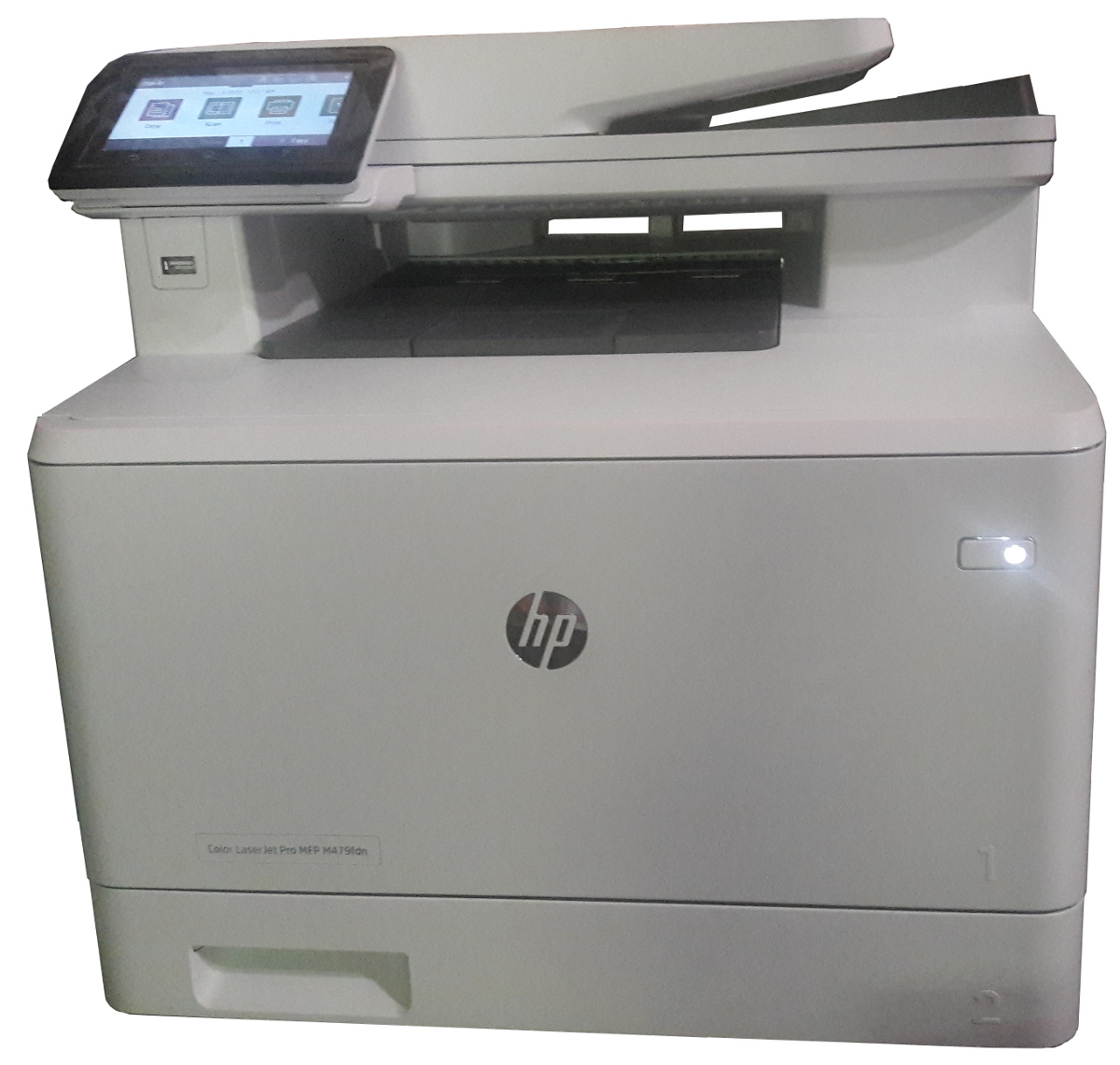
Click to get this printer on Amazon.com where I'm an affiliate.
Not too long ago, I ordered a new color drump for my old printer and replaced it. Not very long after that the print simply decided to not print at all anymore. Literally, it would pass the page through just fine but it had nothing on the page. I know it was working since it was printin g just fine the day before and there was still plenty of black ink (it would have had the light on if the black was not enough.)
I'm thinking that may have been a ploy by the manufacturer to push me to buy a new printer...
In any event, ...
Safely Processing a Queue of Jobs
Tue, 02/18/2020 - 10:29 — Alexis WilkeWhat is a Queue
In software a queue is a container which is used to add items on one side and remove them on the other in a very efficient manner.
Sorted Queues
When used by a Journal, a queue is often going to support some kind of sorted order. Some jobs are more important than others and these should be built sooner. In other words, we give those jobs a higher priority and we sort the queue by priority first then using the time at which the job gets inserted.
Note that the C++ std::queue and std::unque containers do not offer anyway to support a priority. Instead you have to use ...
Docker, an advanced chroot utility
Fri, 11/29/2019 - 19:09 — Alexis Wilke
SECURITY WARNING
Before installing Docker and containers with services on your Linux system, make sure to read and understand the risks as mentioned on this Docker and iptables page. Especially, Docker will make all your containers visible to the entire world through your Internet connection. This is great if you want to indeed share that service with the rest of the world, it's very dangerous if you are working on that container service since it could have security issues that need patching and such. Docker documents a way to prevent that behavior by adding the following rule to your firewall:
iptables -I DOCKER-USER -i eth0 ! -s 192.168.1.0/24 -j DROP
This means that unless the IP address matches 192.168.1.0/24, the access is refused. The `eth0` interface name should be replaced with the interface name you use as the external ethernet connection. During development, you should always have such a rule.
That has not worked at all for me because my local network includes many other computers on my LAN and this rule blocks them all. So really not a useful idea.
Instead, I created my own entries based on some other characteristics. That includes the following lines in my firewall file:
*filter
:DOCKER-USER - [0:0]

-A DOCKER-USER -j early_forward
-A DOCKER-USER -i eno1 -p tcp -m conntrack --ctorigdstport 80 --ctdir ORIGINAL -j DROP
-A DOCKER-USER -i eno1 -p tcp -m conntrack --ctorigdstport 8080 --ctdir ORIGINAL -j DROP
-A DOCKER-USER -i eno1 -p tcp -m conntrack --ctorigdstport 8081 --ctdir ORIGINAL -j DROP
My early_forward allows my LAN to continue to work. These are my firewall rules that allow my LAN computers to have their traffic forwarded as expected.
Then I have three rules that block port 80, 8080, and 8081 from Docker.
Docker will add new rules that will appear after (albeit not within the DOCKER-USER list) and will open ports for whatever necessary service you install in your Dockers.
Note that the only ports you have to block are ports that Docker will share and that you have otherwise open on your main server. If Docker opens port 5000 and your firewall does not allow connections to port 5000 from the outside, then you're already safe. On my end I have Apache running so as a result I block quite usual HTTP ports from Docker.
Docker
As we are helping various customers, we encounter new technologies.
In the old days, we used chroot to create a separate environment where you could have your own installation and prevent the software from within that environment access to everything on your computer. This is particularly useful for publicly facing services liek Apache, Bind, etc.
Help with version 0.1.7 of Zipios (CVE-2019-13453)
Fri, 07/12/2019 - 17:45 — Alexis WilkeHere is yet another example of why opensource is a really good way of getting things fixed.
Assuming you have a project that is getting used by many, you are likely to see people post issues about bugs and possible enhancements. Your software is even very likely to get improved on its own by enthousiast users. On Github, for example, it is very easy to fork a project (make a copy) and then work on your version of the software. You can then offer a fix to the main authors of the project with a near one to one copy of the project.
In our case, a security professional, Mike Salvatore, was asked ...
Best C++ Books
Tue, 05/07/2019 - 09:21 — Alexis WilkeOnce in a while someone will ask me which book is best to start learning programming. The fact is that I do not know because I'm already an advanced programmer and it's rather difficult for me to get back to the basics (it feels like a waste of my time, sorry...)
That being said, at Made to Order Software, we've mainly been a C++ shop. We also do a lot of C, PHP, JavaScript and touch many other languages as required by the tasks we perform (bash, cmake, perl, C#, Java, etc.)
That being said, I wanted to underline some of the best C++ books available today. Especially, in the last ...
Put the label of an HTML Input inside the Input element
Mon, 10/29/2018 - 14:41 — Alexis Wilke
Update:
With HTML5 running on pretty much all platforms, you want to use the placeholder attribute instead of any sort of tricks to place a label inside your input widgets.
This is done like this:
<input type="text" placeholder="Phone Number"/>
This example will show "Phone Number" inside the input box until the user types some text in that box.
You can test with the box right here. This is just that one <input .../> tag I placed in my page HTML. (It is not in a form, but the widget itself will work as expected.)
For additional details, I ...
Brief Overview of CRISC Certification Exam
Sat, 06/23/2018 - 14:08 — Alexis WilkeThe CRISC, also known as Certified in Risk and Information Systems Control, is a vendor-neutral certification that validates a professional’s knowledge and experience in the fields of information system control & risk management. The certificate is developed and administered by ISACA and designed for the individuals who work with organizations in mitigating business risks and implement information system controls.
Organizations in today’s world must consistently enhance their infrastructure so that they can survive and thrive in today’s competitive environment. It is a ...
