
everything
Best way to setup a VirtualBox to avoid system crashes on a reboot
Sat, 03/25/2023 - 10:33 — Alexis Wilke
We now use permanent VirtualBox OSes to run part of our infrastructure.
We ran in all sorts of issues with those, but one thing for sure is that you do not want your OS hard drive to fill up because a (re)boot may not be possible after that. This is because the drive is likely to go bust if completely full.
You should, of course, have tools to let you know how filled up your hard drive is to make sure to catch such issues early. In our case, we had a Jira instance that filled up the drive mainly because we made one backup of the database per day. One day, one of those backup ended that ...
3 Efficient Ways to Store Data Long Term
Tue, 01/17/2023 - 19:13 — Alexis Wilke The digital landscape is changing every day. That means that businesses, organizations, and personal information need constant care and attention to maintain their safety, especially if it's data that needs to be kept an eye on for a long time. From being reliable, affordable, and as secure as possible, it's critical that it remains in the right hands.
This is why we've compiled a list of 3 efficient ways to store data long-term, including using off-site cloud storage plus taking advantage of SQL Server Data Tools. Ready to give your info the safety it deserves? Read on…
Top 6 Benefits of Hotel Management Software
Fri, 02/11/2022 - 17:22 — Alexis WilkeTechnology is ever-changing, and it brings huge operational benefits to all industries, including hospitality. However, not every business has the time, energy, funds, and resources to constantly invest in the latest technological breakthroughs.
That being said, there are a few simple and cost-effective operational aids that are easy to setup and make running a hospitality business that much easier, like hotel management software.
Not sure if you need new software for your hotel? Keep reading to learn how digital hotel management solutions improve efficiency.

1. Accurate Reports
Hotel ...
3 Types of Software Every Business Needs
Fri, 01/28/2022 - 19:17 — Alexis WilkeAre you struggling to stay on top of everything in your business?
You don't need to handle everything all alone — there's software specifically designed to help your business thrive without you having to put in more hours. The right software will save you time by keeping everything organized and ready to go.
Learn about the 3 types of software to keep your business running as it should while you focus on more important things.

What Type of Business Do You Have?
As we go through each type, understand that the software your business needs depends mainly ...
Docker, an advanced chroot utility
Fri, 11/29/2019 - 19:09 — Alexis Wilke
SECURITY WARNING
Before installing Docker and containers with services on your Linux system, make sure to read and understand the risks as mentioned on this Docker and iptables page. Especially, Docker will make all your containers visible to the entire world through your Internet connection. This is great if you want to indeed share that service with the rest of the world, it's very dangerous if you are working on that container service since it could have security issues that need patching and such. Docker documents a way to prevent that behavior by adding the following rule to your firewall:
iptables -I DOCKER-USER -i eth0 ! -s 192.168.1.0/24 -j DROP
This means that unless the IP address matches 192.168.1.0/24, the access is refused. The `eth0` interface name should be replaced with the interface name you use as the external ethernet connection. During development, you should always have such a rule.
That has not worked at all for me because my local network includes many other computers on my LAN and this rule blocks them all. So really not a useful idea.
Instead, I created my own entries based on some other characteristics. That includes the following lines in my firewall file:
*filter
:DOCKER-USER - [0:0]

-A DOCKER-USER -j early_forward
-A DOCKER-USER -i eno1 -p tcp -m conntrack --ctorigdstport 80 --ctdir ORIGINAL -j DROP
-A DOCKER-USER -i eno1 -p tcp -m conntrack --ctorigdstport 8080 --ctdir ORIGINAL -j DROP
-A DOCKER-USER -i eno1 -p tcp -m conntrack --ctorigdstport 8081 --ctdir ORIGINAL -j DROP
My early_forward allows my LAN to continue to work. These are my firewall rules that allow my LAN computers to have their traffic forwarded as expected.
Then I have three rules that block port 80, 8080, and 8081 from Docker.
Docker will add new rules that will appear after (albeit not within the DOCKER-USER list) and will open ports for whatever necessary service you install in your Dockers.
Note that the only ports you have to block are ports that Docker will share and that you have otherwise open on your main server. If Docker opens port 5000 and your firewall does not allow connections to port 5000 from the outside, then you're already safe. On my end I have Apache running so as a result I block quite usual HTTP ports from Docker.
Docker
As we are helping various customers, we encounter new technologies.
In the old days, we used chroot to create a separate environment where you could have your own installation and prevent the software from within that environment access to everything on your computer. This is particularly useful for publicly facing services liek Apache, Bind, etc.
Put the label of an HTML Input inside the Input element
Mon, 10/29/2018 - 14:41 — Alexis Wilke
Update:
With HTML5 running on pretty much all platforms, you want to use the placeholder attribute instead of any sort of tricks to place a label inside your input widgets.
This is done like this:
<input type="text" placeholder="Phone Number"/>
This example will show "Phone Number" inside the input box until the user types some text in that box.
You can test with the box right here. This is just that one <input .../> tag I placed in my page HTML. (It is not in a form, but the widget itself will work as expected.)
For additional details, I ...
Bad Google Indexing "Secure" Pages...
Wed, 08/22/2012 - 20:45 — Alexis WilkeAbout a week ago I got a customer who started having their website appear in Google with HTTPS (the secure version of the site.) The pages are served securily, but it uses our website certificate so you get a big bad error saying that everything is broken and if you proceed you'll know what hell is like.
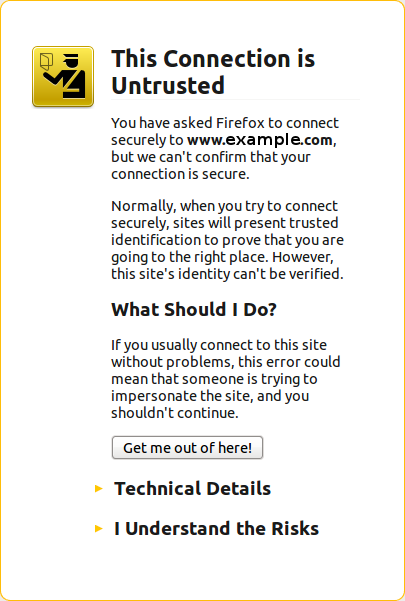 The fact is that this customer never had a secure certificate. In other words, there is no reason for the site to have been referenced with HTTPS unless someone typed a link to their site and inadvertendly entered https://... instead of http://...
I checked a few of the pages where there ...
Using the Taxonomy VTN View feature
One of the options to link terms in a vocabulary to their view is:
taxonomy_view/voc-xxx/term-xxx
This option sends you to that path, exactly (where voc-xxx and term-xxx are numbers representing the vocabulary identifier and term identifier respectively.)
As is, it will tell you that the page does not exist. This is because the taxonomy_view path is to be created with the View module. To create a taxonomy VTN view, you want to define two arguments:
- Vocabulary, and
- Term.
The result is a list of nodes that you can control with very high granularity, sort the way you want them ...
Newsletters from Made to Order Software hosting websites
Subscribing to a Newsletter from a website hosted with us
Made to Order Software offers advanced websites and many of our customers choose to make use of the Newsletter package with their website. It has extraordinary advantages such as adding content to your website at the same time as you are sending emails to your subscribers.
We also offer hidden mailing capabilities such as auto-responders and list management.
How do I unsubscribe?
All subscribers of any one of the lists hosted by Made to Order Software Corp. can always unsubscribe by following the unsubscribe link at the bottom ...
Insert Node Parameter: cck (6-1.2)
The CCK parameter let you insert one of your CCK field and some node fields that cannot otherwise be added without being themed.
We support CCK fields and several special field names as follow.
Fields that appeared after version 6-1.2 have a version specified between parenthesis (i.e. 6-1.3).
cck=field_<name>; [requires CCK]
The CCK parameter must be followed by a field name. An empty name is likely to generate an error. The name of a field that does not exist is likely to generate nothing.
For instance, if you have a field named see_also, you would write:
cck=field_see_also;
