
require
What kind of test do I need for my software?
Sun, 04/16/2023 - 11:27 — Alexis Wilke
Introduction
Most software companies run in that dilemma. In order to write software that works, you want to write some tests. The question for many of these companies is: what kind of tests are most efficient for my business?
Here we talk about seven common test practices in the software industry.
1. Unit Testing
Probably the most used form of testing is Unit Testing. This is easy to write and very effective in discovering bugs. If you are looking at verifying correctness, this is 100% what you need to have to test your software.
Why is it easy to write?
In most cases, Unit ...
Ten Ways To Choose The Right Data Management Tool for Your Needs
Tue, 02/14/2023 - 16:04 — Alexis Wilke
Tools for data management are crucial parts of every organization. With the correct tool, you can efficiently and rapidly manage, store, analyze, and use your data in ways that provide valuable insights. But how can you choose the best data management system for your needs when there are so many options on the market today?
This blog post will offer ten suggestions to assist you in selecting the ideal data management technology for your company.
1. Recognize The Various Tools That Are Available
Data management products come in many different varieties nowadays, each with special ...
3 Efficient Ways to Store Data Long Term
Tue, 01/17/2023 - 19:13 — Alexis Wilke The digital landscape is changing every day. That means that businesses, organizations, and personal information need constant care and attention to maintain their safety, especially if it's data that needs to be kept an eye on for a long time. From being reliable, affordable, and as secure as possible, it's critical that it remains in the right hands.
This is why we've compiled a list of 3 efficient ways to store data long-term, including using off-site cloud storage plus taking advantage of SQL Server Data Tools. Ready to give your info the safety it deserves? Read on…
What is a Golden File in software development?
Mon, 03/14/2022 - 12:34 — Alexis Wilke While programming, one of the best thing to do to make sure that your software works as expected is to write tests.
Actually, if you write enough tests to make sure that the code works as expected, it should take you between two and three more time to finish up your project. So if it takes you one day to write a function, it will take you another two days to write good tests for that one function.
Many of those tests, especially as you construct more and more complex software, require large amount of input and output data. It's easy enough to test a function such as strlen(). It has one ...
Don't Repeat Yourself When Writing Software
Fri, 05/01/2020 - 11:39 — Alexis Wilke
For a very long time now, we have been using languages that support having functions that one can call. That was not always the case, although even really old versions of BASIC had a GOSUB instruction, which it had no concept of local variables so it was rather difficult to use safely.
Functions allow you to avoid repetition. You write a small snippet of code (or maybe not that small) within a function and then you call that function to reuse that snippet over and over again. Good programmers tend to do that even with one liners. However, many others often think: well, it's just one line, why don't I return copy & paste that wherever I need it, it's going to be faster.
Refund Request
We offer a 30 Day Money-Back Guarantee. Please, make sure the invoice date is within the last 30 days.
Since only our registered users can have invoices, we require that you log in your account before asking for a refund. Then go to our Contact Page to send us a refund request with the information about the invoice you want us to refund..
You can find your invoices under your account. Click on the Orders tab to get to the list.
PHP e-Fax requires valid SSL certificates (failed with code 1)
Thu, 07/27/2017 - 15:19 — Alexis WilkeAs e-Fax is updating their systems further to be compliant with various security systems, some new problems may arise on your servers.
The main one is an SSL error that is quite unclear.
Warning: stream_socket_client(): SSL operation failed with code 1. OpenSSL Error messages: error:14090086:SSL routines:ssl3_get_server_certificate:certificate verify failed in /path-to-php-efax/http_request.php on line 294
As we can see, the error mentions a server certificate function and says it could not verify a certificate.
If your server is not 100% up to date with newest SSL versions or your web ...
Protected Node Rules Support
The following features are available only when installing the Rules extension of protected nodes. This extension requires the thrid party Rules extension for Drupal.
Protected Node Rules Conditions
When handling a Node, it is possible to check whether the node is currently protected or locked.
Protected Nodes
A node is said protected when the node was protected by a password using the Protected node module.
Whether the user can view that node is irrevelant in this case. Only the fact that the node requires a password to be viewed is what this condition checks.
Locked Nodes
A ...
Upgrade to PHP 5.3.3 or newer because of security issue
Thu, 06/09/2011 - 17:26 — Alexis WilkeIf you are responsible for a Debian or Ubuntu server and run PHP on it, make sure to run the following command to fix several security issues found in PHP:
sudo apt-get install php5-suhosin
This will make the necessary and your PHP version (security wise) will look like you have PHP 5.3.3.
What I found quite annoying in regard to this issue is the fact that it was very difficult to find a mention of this upgrade. All I could find in large number were people saying that you'd have to get an upgrade using the source code of PHP. Somehow, I did not feel like upgrading PHP from ...
Protected Node Password Form
Protected Node Password Form
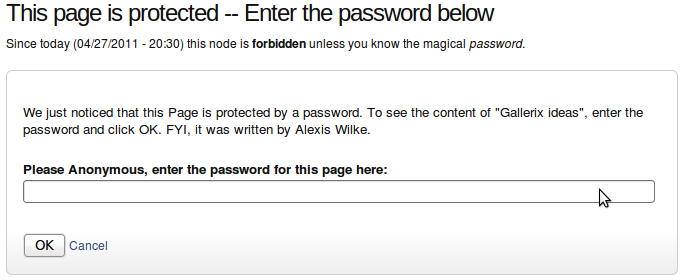 Once a node is protected, users who cannot bypass the password are sent to the password form (see image on the side.)
The password form is very simple. It includes one field for users to enter the node password and an OK button.
When the browser of the user sent us a referrer, then the Protected node module adds a Cancel link back to that referrer. Using the global settings, you can force a Cancel link to always be there. When no referrer is available, the Cancel link will send your users to your home page.
The title, information, description and title over the
