
VTN
Using the Taxonomy VTN View feature
One of the options to link terms in a vocabulary to their view is:
taxonomy_view/voc-xxx/term-xxx
This option sends you to that path, exactly (where voc-xxx and term-xxx are numbers representing the vocabulary identifier and term identifier respectively.)
As is, it will tell you that the page does not exist. This is because the taxonomy_view path is to be created with the View module. To create a taxonomy VTN view, you want to define two arguments:
- Vocabulary, and
- Term.
The result is a list of nodes that you can control with very high granularity, sort the way you want them ...
Parent/Child with Taxonomy VTN
Terms in a taxonomy can be organized as children of other terms. This generates a parent/child organization. For instance, you can have a term Fruit and mark Apple and Peach as children of Fruit.
The parent/child relationship can be used when you organize your Taxonomy VTN to shorten each page of your dictionary. The idea is simple: whenever you enter the top dictionary (taxonomy) page, you only get a list of the root terms (terms that are not children of other terms.) That list gives you access to the children terms and/or nodes of the parent term.
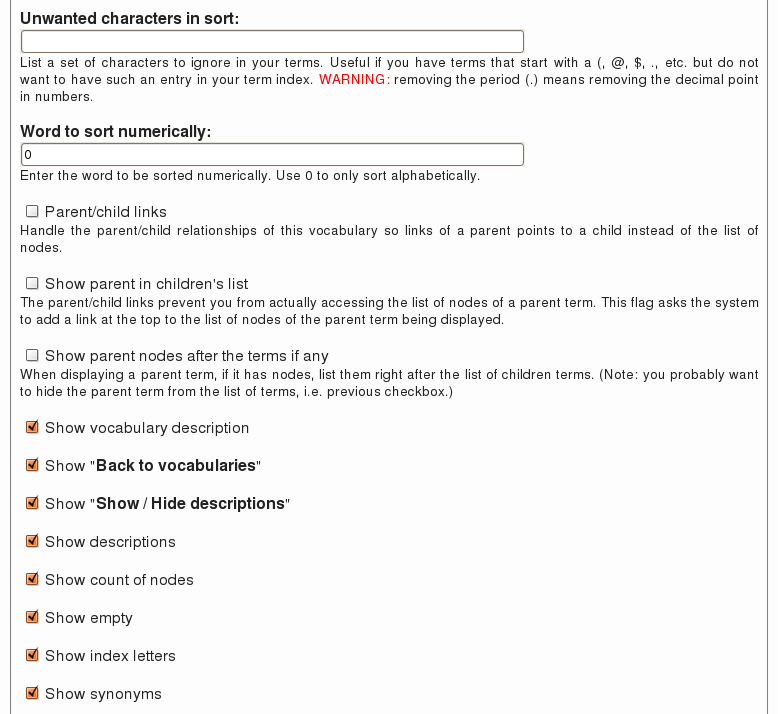 There are three flags you can use to
Creating Groups with Taxonomy VTN
Taxonomy VTN adds many fields in your taxonomy forms. When editing your taxonomy, one field is called Taxonomy VTN Group. This field is used to group different vocabularies (i.e. taxonomies) together in a group.
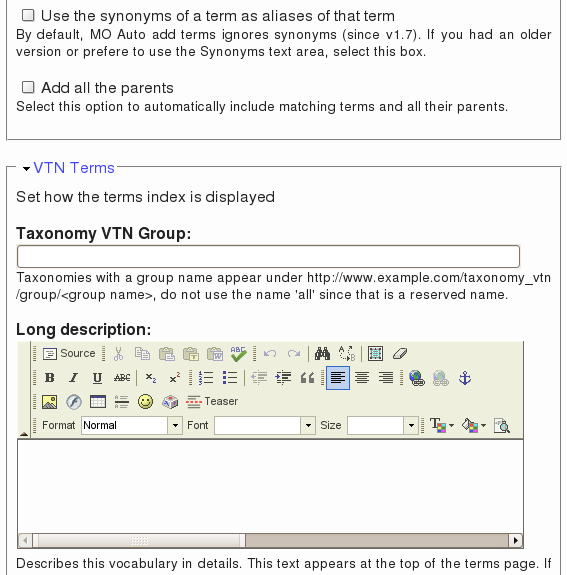 The field accepts one or more group names. The names are case insensitive and are separated by commas. For instance, you could have three names such as: Kitchen, Utensils, Stainless Steel. Then another vocabulary could mention Kitchen and yet another Utensils, Wood.
The groups change the display in the Taxonomy VTN root page. A specific group can also be accessed using the URL:
One or two of the taxonomy columns are too wide
It happens that a column in your main display look too wide. Say you use three columns, one may be real large and two are the normal size (1/3rd of the screen.)
In general this happens because you have a URL in one of your description. (If the URL is in the title, I strongly advice that you move it to the description.) Then the description shows up as wide as that URL. Long URLs will have a real bad effect making the column much wider.
There are two ways to solve the problem:
- Create a tiny URL, although tiny URLs may still be too big, it may help
- Change the settings of the ...
Problems with Taxonomy VTN and their solution
The following are different problems you may encounter whenever you work with Taxonomy VTN. Those problems usually have a work around and the following pages tell you about the solutions available to you.
Taxonomy VTN (The Module —)
The Taxonomy VTN module for Drupal is used to display your taxonomies (also called vocabularies) in a dictionary type of a way.
By changing the CSS to your taste, you will really make it match your website look and feel.
The module is very flexible with a very large number of options as described in the following pages.
If you have any question feel free to post a comment on any one of those pages.
