
database
What kind of test do I need for my software?
Sun, 04/16/2023 - 11:27 — Alexis Wilke
Introduction
Most software companies run in that dilemma. In order to write software that works, you want to write some tests. The question for many of these companies is: what kind of tests are most efficient for my business?
Here we talk about seven common test practices in the software industry.
1. Unit Testing
Probably the most used form of testing is Unit Testing. This is easy to write and very effective in discovering bugs. If you are looking at verifying correctness, this is 100% what you need to have to test your software.
Why is it easy to write?
In most cases, Unit ...
Best way to setup a VirtualBox to avoid system crashes on a reboot
Sat, 03/25/2023 - 10:33 — Alexis Wilke
We now use permanent VirtualBox OSes to run part of our infrastructure.
We ran in all sorts of issues with those, but one thing for sure is that you do not want your OS hard drive to fill up because a (re)boot may not be possible after that. This is because the drive is likely to go bust if completely full.
You should, of course, have tools to let you know how filled up your hard drive is to make sure to catch such issues early. In our case, we had a Jira instance that filled up the drive mainly because we made one backup of the database per day. One day, one of those backup ended that ...
3 Efficient Ways to Store Data Long Term
Tue, 01/17/2023 - 19:13 — Alexis Wilke The digital landscape is changing every day. That means that businesses, organizations, and personal information need constant care and attention to maintain their safety, especially if it's data that needs to be kept an eye on for a long time. From being reliable, affordable, and as secure as possible, it's critical that it remains in the right hands.
This is why we've compiled a list of 3 efficient ways to store data long-term, including using off-site cloud storage plus taking advantage of SQL Server Data Tools. Ready to give your info the safety it deserves? Read on…
Safely Processing a Queue of Jobs
Tue, 02/18/2020 - 10:29 — Alexis WilkeWhat is a Queue
In software a queue is a container which is used to add items on one side and remove them on the other in a very efficient manner.
Sorted Queues
When used by a Journal, a queue is often going to support some kind of sorted order. Some jobs are more important than others and these should be built sooner. In other words, we give those jobs a higher priority and we sort the queue by priority first then using the time at which the job gets inserted.
Note that the C++ std::queue and std::unque containers do not offer anyway to support a priority. Instead you have to use ...
No more excuses! Protect your passwords on your computer with strong encryption.
Wed, 02/14/2018 - 18:05 — Alexis WilkeMore and more, we hear talks about hackers entering personal accounts on systems such as Facebook, Twitter, Instagram and many others. There are many reasons why someone's account will be hacked. One of them is the lack of imagination for their password. Plus, some people use the same password for all of their accounts.
So, if you do it right, you will end up with many passwords. On my end, I have one password per account and that means about 400 passwords... That's totally unmanageable in a fairly standard human brain. For this reason, you end up writing down all your passwords on ...
Getting Rid of Deactivated Facebook Friends
Thu, 12/21/2017 - 14:25 — Alexis WilkeLast updated in Dec 31, 2017 as many things have changed.
Not only that, I also noticed that "dead" accounts are not always really dead.
Read below to learn more.
I was slowly nearing 5,000 friends when all of a sudden I had 5,089!
Wondering what was happening, a post on the Blackhat World forum caught my eye as someone mentioned the fact that he had 5,700 friends. The answer was that deactivated friends do count against your 5,000 friends limit. They are counted as part of your friends even though they do not have an account anymore and they don't get automatically removed ...
The set_fax_id() function PHP e-Fax must be given unique IDs, each time.
Wed, 11/01/2017 - 14:35 — Alexis Wilke
The PHP eFax system uses a class that ease the communication between your software and eFax. The developer system is not too complicated, but there are tricks to it and the class hides most of them.
Today a customer contacted us as they just purchased a copy of our PHP library and had problems sending faxes. The fact is that they used the set_fax_id() function with a hard coded string. Imagine doing something like:
$efax->set_fax_id("Test Fax");
This looks pretty good, only after the second time the sending of the fax will fail because eFax considers that it was already ...
Protected Node per Node Type Settings
Node Type extension
The Protected Node module adds a field set to the Node Type form that you edit under:
Administer » Content management » Content types
These additions are explained in detail below.
The main reason for adding this feature is to avoid seeing the field set on all the node edit forms. With this feature you can hide the form on all the node types that you will never protect with a password.
Protected mode for nodes of this type
This option let you choose how this node type handles the Protected Node capability.
Never protected
This means this node ...
Protected Node Password Field set
Once installed and properly configured, the Protected node module adds a field set in the node edit form (assuming the user has the corresponding permission: "edit any password" or "edit password <node type>".)
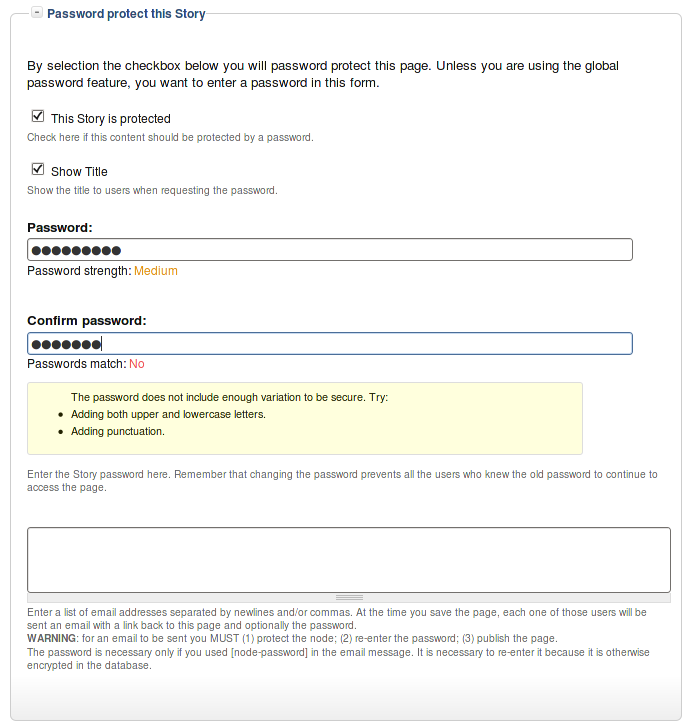 This field set includes two flags, a password, and emails (optional.)
By default, the field set is closed unless you selected protected by default. Whether the field set should be opened or closed can selected in the node type settings.
The <node type> is protected
The first check box is used to password
Protected Node Global Settings
The protected node module has global settings found under:
Administer » Site configuration » Protected node
Protected node Statistics
The page starts with statistics to let you know how pages are protected on your website. All the counts include published and unpublished content.
- Total nodes — the total number of nodes on your website
- Unprotected nodes — number of nodes that do not have a password
-
Protected nodes — number of nodes that are current protected by a password
- Showing title — number of nodes showing their ...
