
PHP
What kind of test do I need for my software?
Sun, 04/16/2023 - 11:27 — Alexis Wilke
Introduction
Most software companies run in that dilemma. In order to write software that works, you want to write some tests. The question for many of these companies is: what kind of tests are most efficient for my business?
Here we talk about seven common test practices in the software industry.
1. Unit Testing
Probably the most used form of testing is Unit Testing. This is easy to write and very effective in discovering bugs. If you are looking at verifying correctness, this is 100% what you need to have to test your software.
Why is it easy to write?
In most cases, Unit ...
Best C++ Books
Tue, 05/07/2019 - 09:21 — Alexis WilkeOnce in a while someone will ask me which book is best to start learning programming. The fact is that I do not know because I'm already an advanced programmer and it's rather difficult for me to get back to the basics (it feels like a waste of my time, sorry...)
That being said, at Made to Order Software, we've mainly been a C++ shop. We also do a lot of C, PHP, JavaScript and touch many other languages as required by the tasks we perform (bash, cmake, perl, C#, Java, etc.)
That being said, I wanted to underline some of the best C++ books available today. Especially, in the last ...
PHP eFax requires "ssl://" on RedHat EL7 and Ubuntu
Mon, 10/15/2018 - 20:32 — Alexis WilkeWe found out today that RedHat LE7 requires the use of the "ssl://" protocol instead of the default "tls://". The error we are getting from PHP looks like this:
PHP Warning:  stream_socket_client(): SSL operation failed with code 1. OpenSSL Error messages:
error:1409442E:SSL routines:ssl3_read_bytes:tlsv1 alert protocol version in .../lib/http_request.php on line 294
PHP Warning:  stream_socket_client(): Failed to enable crypto in .../lib/http_request.php on line 294
PHP Warning: stream_socket_client(): unable to connect to tls://secure.efaxdeveloper.com:443 ...The set_fax_id() function PHP e-Fax must be given unique IDs, each time.
Wed, 11/01/2017 - 14:35 — Alexis Wilke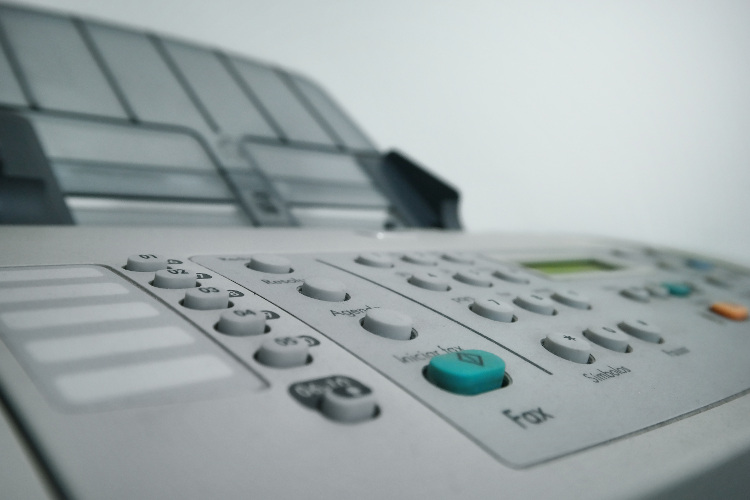
The PHP eFax system uses a class that ease the communication between your software and eFax. The developer system is not too complicated, but there are tricks to it and the class hides most of them.
Today a customer contacted us as they just purchased a copy of our PHP library and had problems sending faxes. The fact is that they used the set_fax_id() function with a hard coded string. Imagine doing something like:
$efax->set_fax_id("Test Fax");
This looks pretty good, only after the second time the sending of the fax will fail because eFax considers that it was already ...
PHP e-Fax requires valid SSL certificates (failed with code 1)
Thu, 07/27/2017 - 15:19 — Alexis WilkeAs e-Fax is updating their systems further to be compliant with various security systems, some new problems may arise on your servers.
The main one is an SSL error that is quite unclear.
Warning: stream_socket_client(): SSL operation failed with code 1. OpenSSL Error messages: error:14090086:SSL routines:ssl3_get_server_certificate:certificate verify failed in /path-to-php-efax/http_request.php on line 294
As we can see, the error mentions a server certificate function and says it could not verify a certificate.
If your server is not 100% up to date with newest SSL versions or your web ...
Simplemenu Settings
Menu Settings
Menu
Select the menu to be displayed as the Simplemenu. By default, we display the Navigation Menu which makes the most sense for administrator (as the Simplemenu was primarily created for administrators wanting to quickly go to all administration pages.)
Theme
Select a theme to display your Simplemenu items and dropdowns. The default is called original.
The themes reside in the module sub-folder named themes. Each theme is defined in a specific directory named after the theme. That name is what appears in the dropdown in the settings.
It is possible to add new themes as
Upgrade to PHP 5.3.3 or newer because of security issue
Thu, 06/09/2011 - 17:26 — Alexis WilkeIf you are responsible for a Debian or Ubuntu server and run PHP on it, make sure to run the following command to fix several security issues found in PHP:
sudo apt-get install php5-suhosin
This will make the necessary and your PHP version (security wise) will look like you have PHP 5.3.3.
What I found quite annoying in regard to this issue is the fact that it was very difficult to find a mention of this upgrade. All I could find in large number were people saying that you'd have to get an upgrade using the source code of PHP. Somehow, I did not feel like upgrading PHP from ...
Protected Node Password Field set
Once installed and properly configured, the Protected node module adds a field set in the node edit form (assuming the user has the corresponding permission: "edit any password" or "edit password <node type>".)
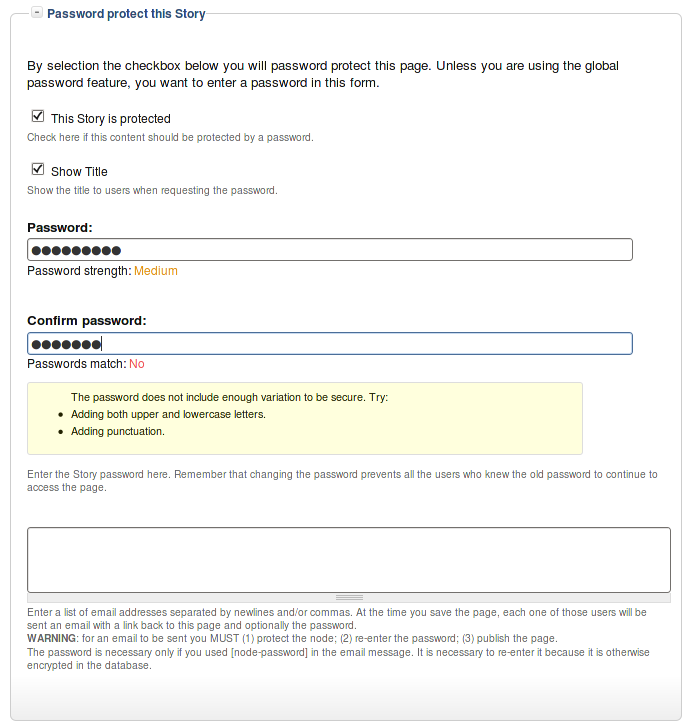 This field set includes two flags, a password, and emails (optional.)
By default, the field set is closed unless you selected protected by default. Whether the field set should be opened or closed can selected in the node type settings.
The <node type> is protected
The first check box is used to password
How to bypass Drupal strong security?
Thu, 02/17/2011 - 17:45 — Alexis WilkeInterestingly enough, today I received a Security Advisory from Drupal saying that users received an email from a hacker asking them to install a Trojan module on their Drupal system.
I find it quite interesting since, if Drupal wasn't secure, the hackers would not have to ask you to make it unsecure, would they?
However, this shows how many CMS systems introduce a security issue problem to your web server installation since it is required to let your web server execute any one PHP file...
All the files installed on your web server and that are directly accessible from the outside (i.e. ...
Table of Contents Known Issues
Various known issues with the Table of Contents module.
Teaser appear, FCKeditor accentuated letters, Back to top arrow, Filters interaction (JavaScript removal,) headers numbering, double numbering...
