
body
Simplemenu Settings
Menu Settings
Menu
Select the menu to be displayed as the Simplemenu. By default, we display the Navigation Menu which makes the most sense for administrator (as the Simplemenu was primarily created for administrators wanting to quickly go to all administration pages.)
Theme
Select a theme to display your Simplemenu items and dropdowns. The default is called original.
The themes reside in the module sub-folder named themes. Each theme is defined in a specific directory named after the theme. That name is what appears in the dropdown in the settings.
It is possible to add new themes as
Protected Node Global Settings
The protected node module has global settings found under:
Administer » Site configuration » Protected node
Protected node Statistics
The page starts with statistics to let you know how pages are protected on your website. All the counts include published and unpublished content.
- Total nodes — the total number of nodes on your website
- Unprotected nodes — number of nodes that do not have a password
-
Protected nodes — number of nodes that are current protected by a password
- Showing title — number of nodes showing their ...
jsMath Security Issue
Security Issue
A security issue was found in all versions of jsMath before 2.x-dev for Drupal 6.x of Jul 29, 2010.
You may still securely use older versions of jsMath on private websites and websites were you are the only user (as in, the only one who can log in.)
The Drupal Security Advisory issue is here: https://www.drupal.org/node/854402
Other Problem
There is another problem: jsMath offers a JavaScript function that parses entire web pages (although there are ways to circumvent that problem, the module does not currently make use of those.) The jsMath Drupal module uses the ...
Table of Contents Known Issues
Various known issues with the Table of Contents module.
Teaser appear, FCKeditor accentuated letters, Back to top arrow, Filters interaction (JavaScript removal,) headers numbering, double numbering...
Handling of Pop-up Windows by SimpleMenu
Feature
By default, SimpleMenu is not shown on pop-up windows. There is a flag in the SimpleMenu settings that can be unchecked to avoid this side effect. The pop-up capability is often detected when you open a new tab from the current window. It will depend on the browser and the link being clicked1.
Quick Fix
When the menu is only used by the administrators, it is possible to simply open a new tab and copy and paste the URL from the existing window with the missing menu to the ...
- 1. We are trying to ameliorate the code, but it is not easy to make it work properly 100% of the time.
SimpleMenu (The module —)
The SimpleMenu module for Drupal 6.x and 7.x offers a drop-down menu that inserts itself at the top of your browser window on your website.
The menu can be fixed1 or scroll with the page.
By default, SimpleMenu presents the Navigation menu in Drupal 6.x and the Management menu in Drupal 7.x. You can change the SimpleMenu settings to display a different menu and show it on another tag than the Body tag.
The following pages ...
- 1. At this time the fixed menu doesn't handle very long menus properly meaning that some menu items will not be accessible (disappear at the bottom of the page.)
Help for To Do List End Users
Introduction
 This page documents the usage of the To Do List module to end users (i.e. not how to install and setup the module, but how to create To Do List items, share them, mark them started/finished, etc.)
For administrative information check out the To Do List module help.
How do I create a menu entry with Drupal?
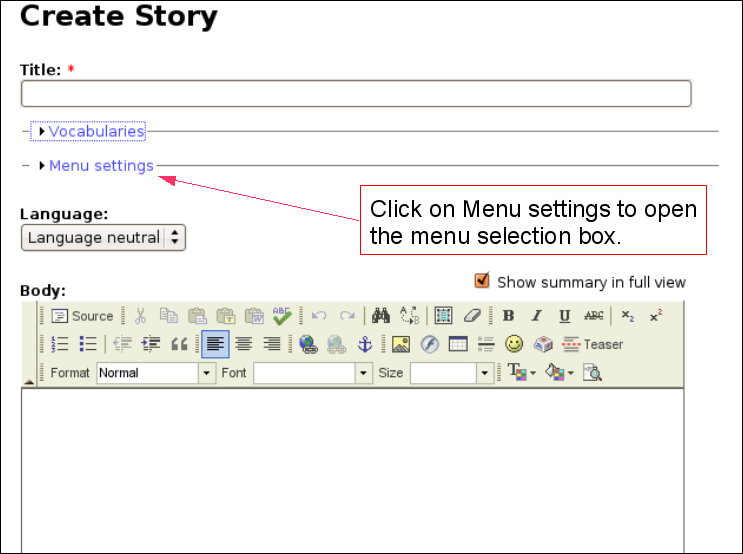 Pages and menus are separate modules in Drupal.
Insert Nodes used as a macro (6.x-1.2)
This module can be used to create macros (as pointed out by one of our user in a Drupal issue.)
The following steps show you how you can create a macro with the Insert Node module.
Create the Macro
First, create a node that is to become the macro. We will call this node macro. It is used without the Insert Node filter so the Insert Node tags do not get changed. This is important since we reference the main node (with the asterisk) and that reference would look like a recursive reference.
One idea is to use the macro as a PayPal button which gets set with parameters from another node. ...
Insert Node Examples
To send someone back to your home page:
You will find the necessary links on my home page: [node:home link]To include a hidden node as a reference in a post:
I talked about that in my post yesterday. [node:yesterday_post_name body collapsed]To include a node from a forum or story and keep the comments:
See below: [node:57 themed comments]