
come back
Deleting a (Duplicate) Retweet from your Twitter Feed
Sat, 02/03/2018 - 17:30 — Alexis WilkeDouble Retweeting and How to Avoid Over-Duplication
I have seen many people retweeting like crazy and I've noticed that once in a while these people have been retweeting the exact same tweet more than once.
I'm pretty sure that in most cases these people ignore the fact. Personally I find their twitter feed annoying because of that. Retweeting is totally okay, it's sharing what others have tweeted and there is nothing wrong with it. However, seeing the exact same tweet 2, 3, 4, or even 5 times pretty much in a row is rather bad taste. I understand that this very tweet is super ...
Getting Rid of Deactivated Facebook Friends
Thu, 12/21/2017 - 14:25 — Alexis WilkeLast updated in Dec 31, 2017 as many things have changed.
Not only that, I also noticed that "dead" accounts are not always really dead.
Read below to learn more.
I was slowly nearing 5,000 friends when all of a sudden I had 5,089!
Wondering what was happening, a post on the Blackhat World forum caught my eye as someone mentioned the fact that he had 5,700 friends. The answer was that deactivated friends do count against your 5,000 friends limit. They are counted as part of your friends even though they do not have an account anymore and they don't get automatically removed ...
Thank you for subscribing to Fax Now Online
Thank you for subscribing to Fax Now Online.
Please, check out your account (under My Account, click on My Account Options and then on the tab named MO Fax,) and feel free to change the default fax settings.
To send a fax, click on My Account and then Send a Fax Now. This opens a form where you can enter the fax data and then send it to our fax servers. The form is pretty well documented. For additional help, check out the Fax Now Online Browser page.
Whenever you come back, you will have to log in your account first. To do so, click on My Account and you will see a Log In menu entry. ...
Upgrade from Table of Contents 2.x to 3.x
Make a Backup
DO NOT FORGET TO MAKE A BACKUP OF YOUR DATABASE & CODE.
That way you can come back to your previous version if anything goes wrong. So far, no one told me that they had a problem upgrading. Although version 2.x did not have any schema, the new module may modify nodes and generate incompatible tags.
Show stopper
Version 3.x has a new theme() scheme. It is much more powerful has it allows you to create your own header numbering, etc. However, if you already had a theme() overload in your theme, it will stop working until fixed.
Please, in this case, make sure to upgrade on
How do I add my Facebook badge to my Blogger page?
Wed, 04/14/2010 - 04:17 — Alexis WilkeWhen I created my blog on Blogger, I felt like it was a bit dry at first. So I looked into what to add in the column on the side... Since I like to make friends on Facebook, I thought that adding my badge would be a good idea.
It is quick to do and everyone can do it, really! So... first log in both Blogger and Facebook. In Facebook, go to your wall and click on Edit My Profile. The link is under your picture (and I hope you uploaded a photo! People want to see your face!!! Not your dog or your car.)
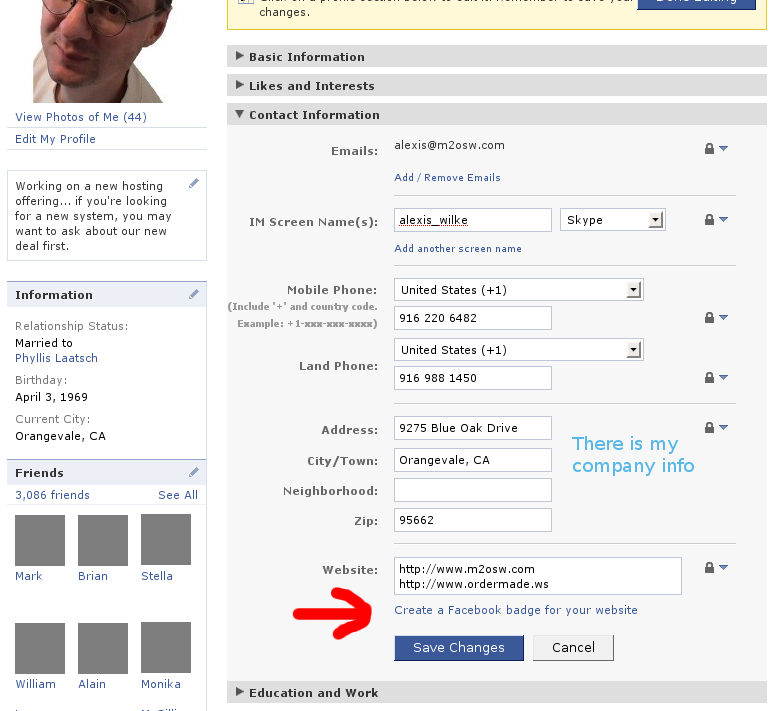
Once in your profile, click on the Contact Information bar. Then click on the ...
Coming back at the right place when adding/editing/deleting Comments
It is now possible (See #418004: Comments included --> Back after reply) to have Drupal send you back to the page that inserts the node instead of the inserted node. Say you create node A and B. You include node A inside node B. You are looking at node B now. You decide to add a comment on node A (that you see from within node B.) Click on the Add new comment link, write the comment and click Save. At that point, you probably want to come back to node B instead of node A.
This feature is only necessary if you have the links at the bottom of the node and allow comments to show up.
The ...
