
include
Ten Ways To Choose The Right Data Management Tool for Your Needs
Tue, 02/14/2023 - 16:04 — Alexis Wilke
Tools for data management are crucial parts of every organization. With the correct tool, you can efficiently and rapidly manage, store, analyze, and use your data in ways that provide valuable insights. But how can you choose the best data management system for your needs when there are so many options on the market today?
This blog post will offer ten suggestions to assist you in selecting the ideal data management technology for your company.
1. Recognize The Various Tools That Are Available
Data management products come in many different varieties nowadays, each with special ...
Basic Website Development Tools Every Blockchain Developer Needs
Mon, 05/09/2022 - 22:02 — Alexis WilkeDevelopers can choose from many advanced software applications in today’s environment of intensive research on potential uses for blockchain technology. Web development tools include Ethereum DApps Development where researchers and developers strive to build decentralized apps and smart contracts. Smart contracts have the built-in ability to adjust based on changes to key terms and to monitor compliance with the terms of the contract.
Blockchain development tools help to facilitate software development. If a developer is new to blockchain or lacks experience, he or she should become ...
8 Things to Consider Before Choosing Payroll Software
Sat, 04/16/2022 - 14:30 — Alexis WilkeAre you in the process of purchasing payroll software for your business? Selecting the right one is not as easy as you may think, especially when you don’t know exactly what you’re looking for.
This article examines a few things you should know before selecting a software solution that meets your needs.

3 Types of Software Every Business Needs
Fri, 01/28/2022 - 19:17 — Alexis WilkeAre you struggling to stay on top of everything in your business?
You don't need to handle everything all alone — there's software specifically designed to help your business thrive without you having to put in more hours. The right software will save you time by keeping everything organized and ready to go.
Learn about the 3 types of software to keep your business running as it should while you focus on more important things.

What Type of Business Do You Have?
As we go through each type, understand that the software your business needs depends mainly ...
Docker, an advanced chroot utility
Fri, 11/29/2019 - 19:09 — Alexis Wilke
SECURITY WARNING
Before installing Docker and containers with services on your Linux system, make sure to read and understand the risks as mentioned on this Docker and iptables page. Especially, Docker will make all your containers visible to the entire world through your Internet connection. This is great if you want to indeed share that service with the rest of the world, it's very dangerous if you are working on that container service since it could have security issues that need patching and such. Docker documents a way to prevent that behavior by adding the following rule to your firewall:
iptables -I DOCKER-USER -i eth0 ! -s 192.168.1.0/24 -j DROP
This means that unless the IP address matches 192.168.1.0/24, the access is refused. The `eth0` interface name should be replaced with the interface name you use as the external ethernet connection. During development, you should always have such a rule.
That has not worked at all for me because my local network includes many other computers on my LAN and this rule blocks them all. So really not a useful idea.
Instead, I created my own entries based on some other characteristics. That includes the following lines in my firewall file:
*filter
:DOCKER-USER - [0:0]

-A DOCKER-USER -j early_forward
-A DOCKER-USER -i eno1 -p tcp -m conntrack --ctorigdstport 80 --ctdir ORIGINAL -j DROP
-A DOCKER-USER -i eno1 -p tcp -m conntrack --ctorigdstport 8080 --ctdir ORIGINAL -j DROP
-A DOCKER-USER -i eno1 -p tcp -m conntrack --ctorigdstport 8081 --ctdir ORIGINAL -j DROP
My early_forward allows my LAN to continue to work. These are my firewall rules that allow my LAN computers to have their traffic forwarded as expected.
Then I have three rules that block port 80, 8080, and 8081 from Docker.
Docker will add new rules that will appear after (albeit not within the DOCKER-USER list) and will open ports for whatever necessary service you install in your Dockers.
Note that the only ports you have to block are ports that Docker will share and that you have otherwise open on your main server. If Docker opens port 5000 and your firewall does not allow connections to port 5000 from the outside, then you're already safe. On my end I have Apache running so as a result I block quite usual HTTP ports from Docker.
Docker
As we are helping various customers, we encounter new technologies.
In the old days, we used chroot to create a separate environment where you could have your own installation and prevent the software from within that environment access to everything on your computer. This is particularly useful for publicly facing services liek Apache, Bind, etc.
Help with version 0.1.7 of Zipios (CVE-2019-13453)
Fri, 07/12/2019 - 17:45 — Alexis WilkeHere is yet another example of why opensource is a really good way of getting things fixed.
Assuming you have a project that is getting used by many, you are likely to see people post issues about bugs and possible enhancements. Your software is even very likely to get improved on its own by enthousiast users. On Github, for example, it is very easy to fork a project (make a copy) and then work on your version of the software. You can then offer a fix to the main authors of the project with a near one to one copy of the project.
In our case, a security professional, Mike Salvatore, was asked ...
Brief Overview of CRISC Certification Exam
Sat, 06/23/2018 - 14:08 — Alexis WilkeThe CRISC, also known as Certified in Risk and Information Systems Control, is a vendor-neutral certification that validates a professional’s knowledge and experience in the fields of information system control & risk management. The certificate is developed and administered by ISACA and designed for the individuals who work with organizations in mitigating business risks and implement information system controls.
Organizations in today’s world must consistently enhance their infrastructure so that they can survive and thrive in today’s competitive environment. It is a ...
Avoid automatic translation of Facebook posts
Sun, 12/31/2017 - 16:50 — Alexis WilkeOnce more today my French friend's post was translated.
French is my mother tongue so I sure don't need the automatic translation for French on my Facebook wall. I also like to read a couple other languages, even if I'm not at the best level I only need a little help with a few words here and there, so I like to have those in the original language to improve. The more you read a language the more you learn about it. Same if you live in a country and start talking with people there. You're going to learn a lot more that way than staying at home and not talking to anyone any ...
Getting Rid of Deactivated Facebook Friends
Thu, 12/21/2017 - 14:25 — Alexis WilkeLast updated in Dec 31, 2017 as many things have changed.
Not only that, I also noticed that "dead" accounts are not always really dead.
Read below to learn more.
I was slowly nearing 5,000 friends when all of a sudden I had 5,089!
Wondering what was happening, a post on the Blackhat World forum caught my eye as someone mentioned the fact that he had 5,700 friends. The answer was that deactivated friends do count against your 5,000 friends limit. They are counted as part of your friends even though they do not have an account anymore and they don't get automatically removed ...
Bad Google Indexing "Secure" Pages...
Wed, 08/22/2012 - 20:45 — Alexis WilkeAbout a week ago I got a customer who started having their website appear in Google with HTTPS (the secure version of the site.) The pages are served securily, but it uses our website certificate so you get a big bad error saying that everything is broken and if you proceed you'll know what hell is like.
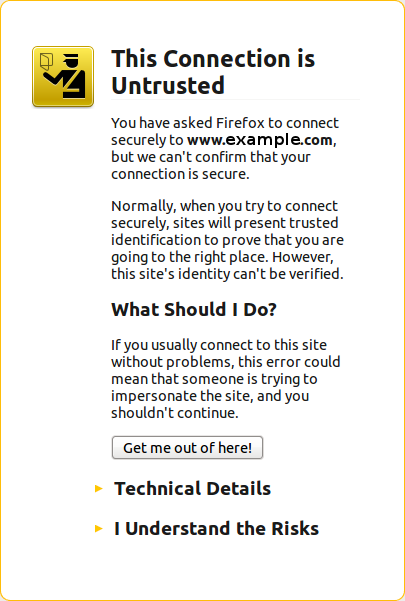 The fact is that this customer never had a secure certificate. In other words, there is no reason for the site to have been referenced with HTTPS unless someone typed a link to their site and inadvertendly entered https://... instead of http://...
I checked a few of the pages where there ...
