
CSS
Put the label of an HTML Input inside the Input element
Mon, 10/29/2018 - 14:41 — Alexis Wilke
Update:
With HTML5 running on pretty much all platforms, you want to use the placeholder attribute instead of any sort of tricks to place a label inside your input widgets.
This is done like this:
<input type="text" placeholder="Phone Number"/>
This example will show "Phone Number" inside the input box until the user types some text in that box.
You can test with the box right here. This is just that one <input .../> tag I placed in my page HTML. (It is not in a form, but the widget itself will work as expected.)
For additional details, I ...
CSS3 media queries
Sat, 01/14/2012 - 22:26 — Alexis WilkeCSS is improving with the introduction of CSS3.
Contrary to the previous version, CSS3 supports selections that are very advanced, offering capabilities close to what you could write in JavaScript.
Today I wanted to talk about the Media Queries because that can be used to very much optimize the list of links used to load your CSS data.
In HTML, you can use a <link ...> to add a CSS file to your page.
<link rel="stylesheet" type="text/css" href="style.css" />
In this case, the file style.css will always be loaded, whatever the media being used.
Simplemenu Settings
Menu Settings
Menu
Select the menu to be displayed as the Simplemenu. By default, we display the Navigation Menu which makes the most sense for administrator (as the Simplemenu was primarily created for administrators wanting to quickly go to all administration pages.)
Theme
Select a theme to display your Simplemenu items and dropdowns. The default is called original.
The themes reside in the module sub-folder named themes. Each theme is defined in a specific directory named after the theme. That name is what appears in the dropdown in the settings.
It is possible to add new themes as
Simplemenu Upgrade Path
Version 7.x
Version 7.x-1.x-dev is a starting point... It is not complete, although it shows you a functional Management menu as a dropdown. More to come as time allows... See issue [#791664] for more info.
Version 6.x
Version 6.x-1.13 fixes the vertical menu problem which had to do with CSS caching getting lost.
Version 6.x-1.10 to 6.x-1.12 fixes the non-called theme() function versus the other sub-modules that have callbacks through the theme() calls. However, we really need to have callbacks instead. Added horizontal and vertical themes. Attempts to fix to the vertical menu problem
SimpleMenu Custom Theme
Introduction
The newer versions of SimpleMenu allows for an easy way of adding custom themes.
There are two main ways to add new SimpleMenu themes:
1. In the simplemenu themes folder;
2. In your theme folder.
SimpleMenu themes folder
CSS
If you look under the simplemenu folder, you will see a sub-folder named themes. You can place your own specialized themes in that folder to make them available system-wide (i.e. if you are using many themes or use one Drupal installation for many websites.) In other words, this folder is viewed as a global theme folder.
The themes folder ...
Only add identifiers and optionally numbers to my headers
Proposition
The Table of Contents module uses the headers to get generated. Each header gets a unique identifier when none were assigned manually. The Table of Contents module uses the text between the start and end tags as the title to show in the table of contents.
Very good!
Now, you may not want the Table of Contents itself, but you like the idea to have identifiers in all your headers. This can be useful to create in-page links (a link with an anchor, i.e. #some-name at the end of your URL.) It is generally annoying to have to enter the identifiers by hand for each header and you may
Table of Contents Settings
Filter Configuration
At this point, most of the Table of Contents configuration is done in the Table of Contents filter.
This means multiple Input formats allow you to make use of several different configurations.
Table of Contents Known Issues
Various known issues with the Table of Contents module.
Teaser appear, FCKeditor accentuated letters, Back to top arrow, Filters interaction (JavaScript removal,) headers numbering, double numbering...
SimpleMenu Known Issues
SimpleMenu Disappears
There following are a few of the main reasons why SimpleMenu disappears.
Pop-up Windows
By default, SimpleMenu wants to hide itself in pop-up windows. This is a feature.
The reason is that many websites will open pop-up windows for all kinds of extra-features such as uploading an image or printing some description of an image or the definition of a word or product.
These windows should not include the SimpleMenu bar.
There is a dedicated page giving several different ways to fix this problem on your website.
Menu Overflow
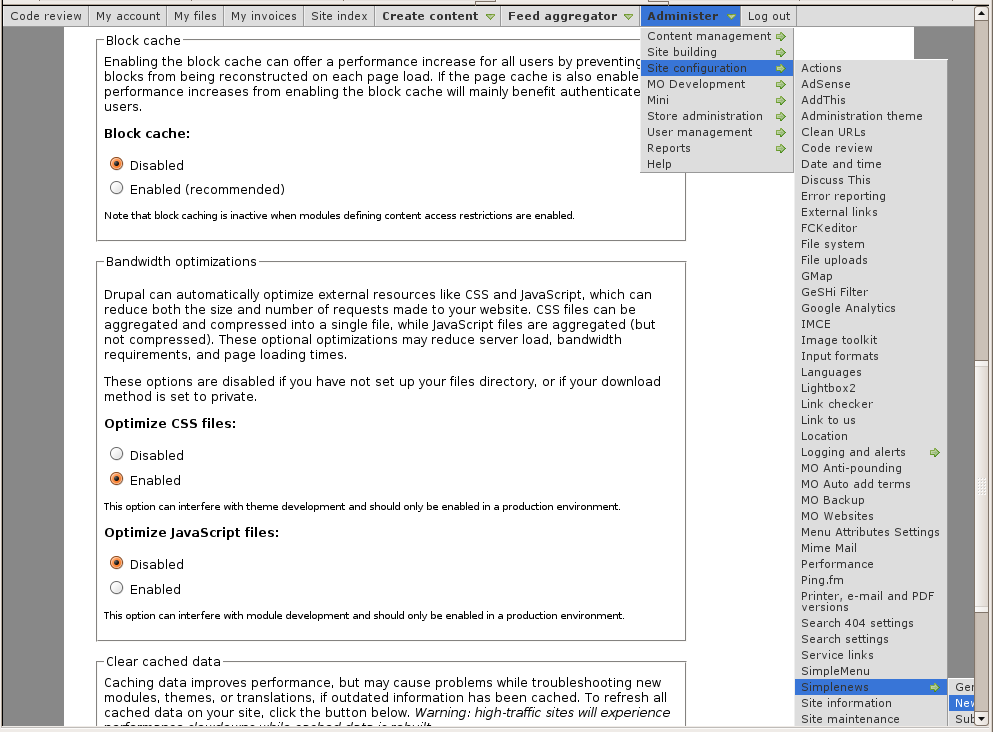 Very long menus will disappear on the
Insert Node Parameter: modified (6-1.0)
This parameter inserts the date when the node was last modified.
Note that a node that was never edited does not have a modification date. When that happens, the creation date is used instead.
The date is formatted using the default format date function (see the Drupal format_date() function.)
CSS Class: span.insert-node-date
Theme: InsertNode_modified
See Also: Insert Node Parameter: created (6-1.0)
