
theme
Simplemenu Settings
Menu Settings
Menu
Select the menu to be displayed as the Simplemenu. By default, we display the Navigation Menu which makes the most sense for administrator (as the Simplemenu was primarily created for administrators wanting to quickly go to all administration pages.)
Theme
Select a theme to display your Simplemenu items and dropdowns. The default is called original.
The themes reside in the module sub-folder named themes. Each theme is defined in a specific directory named after the theme. That name is what appears in the dropdown in the settings.
It is possible to add new themes as
Simplemenu Upgrade Path
Version 7.x
Version 7.x-1.x-dev is a starting point... It is not complete, although it shows you a functional Management menu as a dropdown. More to come as time allows... See issue [#791664] for more info.
Version 6.x
Version 6.x-1.13 fixes the vertical menu problem which had to do with CSS caching getting lost.
Version 6.x-1.10 to 6.x-1.12 fixes the non-called theme() function versus the other sub-modules that have callbacks through the theme() calls. However, we really need to have callbacks instead. Added horizontal and vertical themes. Attempts to fix to the vertical menu problem
MobileKey global settings
The MobileKey module comes with the following settings. These settings are found here:
Administer » Site configuration » MobileKey
Front Page Redirect
Since you generally give one URL to your users, your home page (called Front Page in Drupal), it can be practical to send Mobile phone users to a special URL so when they access your site they see a better adapted front page than the usual.
The settings accept a local path (i.e. mobile) or a full path (i.e. http://mobile.example.com/).
Note that this gives you a way to use the ThemeKey capability to change the theme of all ...
MobileKey addition to ThemeKey
The main idea of MobileKey is to give you the capability to switch your website theme to a mobile specific theme when the user access your site from one's mobile phone. A mobile theme will make it easier to access your website on a mobile device.
For go to the ThemeKey settings page:
Administer » Site configuration » ThemeKey
The MobileKey adds one selection to the list of attributes to match. The new selection is called:
mobile:device
This works everywhere on your website (it is a global option, not specific to any kind of pages.) The system checks different parameters to
MobileKey (The module —)
Introduction to the MobileKey module
The MobileKey module is an extension of the ThemeKey module that gives you a way to switch theme based on whether the user is viewing your website with mobile phone.
The installation is very simple. Follow the default Drupal 6.x installation steps (extract the tarball under your sites/all/modules/ folder.)
The module currently supports two features, a switch to force a mobile specific theme and a global redirect for your website front page.
Simplemenu Inactive Parents
Description
A simple menu is composed of parent menus and children menus. A child has no drop-down menu and a parent does.
By default all the menu items are active, meaning that they all are links one can click on to reach the corresponding destination.
This simplemenu extension allows for turning the link off by replacing the anchor reference in a named anchor. The HTML tag being the same, the simplemenu looks the same, but the item cannot be clicked.
At this time, there is no option to make some of the parent items clickable and others not.
Setup
There is no settings for this module.
SimpleMenu Custom Theme
Introduction
The newer versions of SimpleMenu allows for an easy way of adding custom themes.
There are two main ways to add new SimpleMenu themes:
1. In the simplemenu themes folder;
2. In your theme folder.
SimpleMenu themes folder
CSS
If you look under the simplemenu folder, you will see a sub-folder named themes. You can place your own specialized themes in that folder to make them available system-wide (i.e. if you are using many themes or use one Drupal installation for many websites.) In other words, this folder is viewed as a global theme folder.
The themes folder ...
Upgrade from Table of Contents 2.x to 3.x
Make a Backup
DO NOT FORGET TO MAKE A BACKUP OF YOUR DATABASE & CODE.
That way you can come back to your previous version if anything goes wrong. So far, no one told me that they had a problem upgrading. Although version 2.x did not have any schema, the new module may modify nodes and generate incompatible tags.
Show stopper
Version 3.x has a new theme() scheme. It is much more powerful has it allows you to create your own header numbering, etc. However, if you already had a theme() overload in your theme, it will stop working until fixed.
Please, in this case, make sure to upgrade on
Table of Contents Settings
Filter Configuration
At this point, most of the Table of Contents configuration is done in the Table of Contents filter.
This means multiple Input formats allow you to make use of several different configurations.
SimpleMenu Known Issues
SimpleMenu Disappears
There following are a few of the main reasons why SimpleMenu disappears.
Pop-up Windows
By default, SimpleMenu wants to hide itself in pop-up windows. This is a feature.
The reason is that many websites will open pop-up windows for all kinds of extra-features such as uploading an image or printing some description of an image or the definition of a word or product.
These windows should not include the SimpleMenu bar.
There is a dedicated page giving several different ways to fix this problem on your website.
Menu Overflow
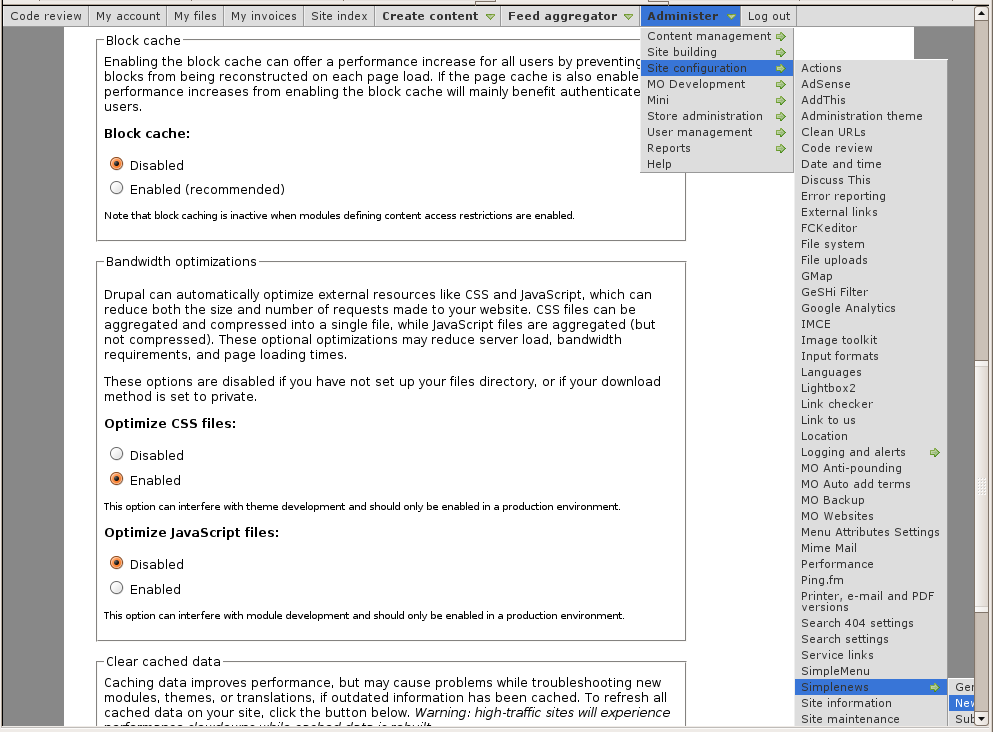 Very long menus will disappear on the
