
8 Things to Consider Before Choosing Payroll Software
Sat, 04/16/2022 - 14:30 — Alexis WilkeAre you in the process of purchasing payroll software for your business? Selecting the right one is not as easy as you may think, especially when you don’t know exactly what you’re looking for.
This article examines a few things you should know before selecting a software solution that meets your needs.

3 Types of Software Every Business Needs
Fri, 01/28/2022 - 19:17 — Alexis WilkeAre you struggling to stay on top of everything in your business?
You don't need to handle everything all alone — there's software specifically designed to help your business thrive without you having to put in more hours. The right software will save you time by keeping everything organized and ready to go.
Learn about the 3 types of software to keep your business running as it should while you focus on more important things.

What Type of Business Do You Have?
As we go through each type, understand that the software your business needs depends mainly ...
Brief Overview of CRISC Certification Exam
Sat, 06/23/2018 - 14:08 — Alexis WilkeThe CRISC, also known as Certified in Risk and Information Systems Control, is a vendor-neutral certification that validates a professional’s knowledge and experience in the fields of information system control & risk management. The certificate is developed and administered by ISACA and designed for the individuals who work with organizations in mitigating business risks and implement information system controls.
Organizations in today’s world must consistently enhance their infrastructure so that they can survive and thrive in today’s competitive environment. It is a ...
Another reason to like SeaMonkey!
Tue, 03/04/2014 - 12:48 — Alexis WilkeAs I mentioned before, I like to use SeaMonkey. In general, browsing wise, it is very much like Firefox so that's good for those people who like Firefox, they can switch without losing much else than the location where the toolbar buttons are (Quite a few are in different places).
The thing I discovered today, though, is really cool. I put a path to an email saved on my disk to see whether the HTML in that email was valid or not and it loaded at once. Just before hitting Enter I though, wait... I probably should remove the email header. Nope. No need. It actually recognized the data and ...
Protected Node per Node Type Settings
Node Type extension
The Protected Node module adds a field set to the Node Type form that you edit under:
Administer » Content management » Content types
These additions are explained in detail below.
The main reason for adding this feature is to avoid seeing the field set on all the node edit forms. With this feature you can hide the form on all the node types that you will never protect with a password.
Protected mode for nodes of this type
This option let you choose how this node type handles the Protected Node capability.
Never protected
This means this node ...
Protected Node Password Field set
Once installed and properly configured, the Protected node module adds a field set in the node edit form (assuming the user has the corresponding permission: "edit any password" or "edit password <node type>".)
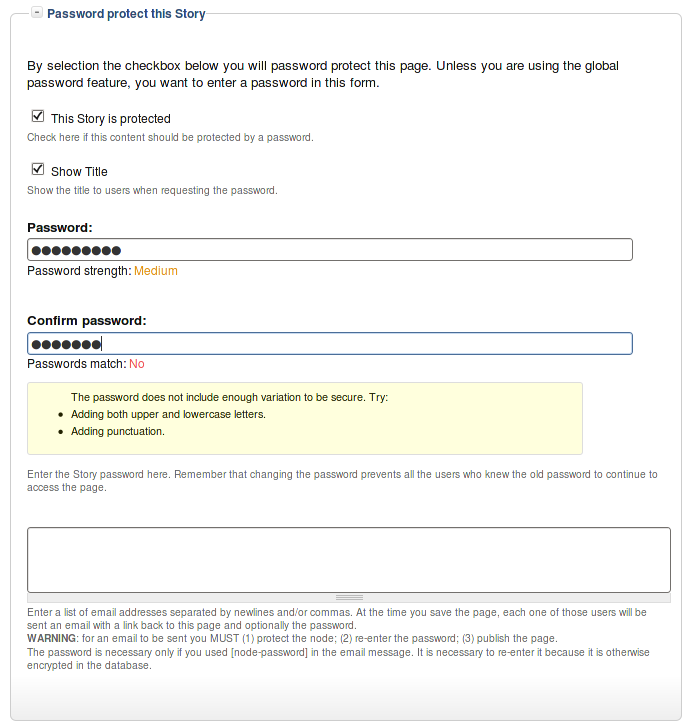 This field set includes two flags, a password, and emails (optional.)
By default, the field set is closed unless you selected protected by default. Whether the field set should be opened or closed can selected in the node type settings.
The <node type> is protected
The first check box is used to password
Protected Node Global Settings
The protected node module has global settings found under:
Administer » Site configuration » Protected node
Protected node Statistics
The page starts with statistics to let you know how pages are protected on your website. All the counts include published and unpublished content.
- Total nodes — the total number of nodes on your website
- Unprotected nodes — number of nodes that do not have a password
-
Protected nodes — number of nodes that are current protected by a password
- Showing title — number of nodes showing their ...
Drupal Aggregator
The default Aggregator Drupal module does not work very well. There are several problems with the Drupal Core module, one of which we have not fixed in our version (i.e. the flatness of the item table.)
There is a list of the known issues and our comments and whether we fixed the problem:
| Problem | Solution in m2osw's version of Aggregator |
|---|---|
| Missing XML marker | The <?xml ... ?> marker is missing from some RSS feeds, add it as required |
| Spurious data | Some RSS feeds add spurious data ... |
How to bypass Drupal strong security?
Thu, 02/17/2011 - 17:45 — Alexis WilkeInterestingly enough, today I received a Security Advisory from Drupal saying that users received an email from a hacker asking them to install a Trojan module on their Drupal system.
I find it quite interesting since, if Drupal wasn't secure, the hackers would not have to ask you to make it unsecure, would they?
However, this shows how many CMS systems introduce a security issue problem to your web server installation since it is required to let your web server execute any one PHP file...
All the files installed on your web server and that are directly accessible from the outside (i.e. ...
To Do Actions
Installation
Go to Administer » Site building » Modules and click on To Do Action to install the Action extension for the To Do module.
This module requires the installation of the Drupal Core Trigger module.
