
Javascript
What kind of test do I need for my software?
Sun, 04/16/2023 - 11:27 — Alexis Wilke
Introduction
Most software companies run in that dilemma. In order to write software that works, you want to write some tests. The question for many of these companies is: what kind of tests are most efficient for my business?
Here we talk about seven common test practices in the software industry.
1. Unit Testing
Probably the most used form of testing is Unit Testing. This is easy to write and very effective in discovering bugs. If you are looking at verifying correctness, this is 100% what you need to have to test your software.
Why is it easy to write?
In most cases, Unit ...
Basic Website Development Tools Every Blockchain Developer Needs
Mon, 05/09/2022 - 22:02 — Alexis WilkeDevelopers can choose from many advanced software applications in today’s environment of intensive research on potential uses for blockchain technology. Web development tools include Ethereum DApps Development where researchers and developers strive to build decentralized apps and smart contracts. Smart contracts have the built-in ability to adjust based on changes to key terms and to monitor compliance with the terms of the contract.
Blockchain development tools help to facilitate software development. If a developer is new to blockchain or lacks experience, he or she should become ...
Best C++ Books
Tue, 05/07/2019 - 09:21 — Alexis WilkeOnce in a while someone will ask me which book is best to start learning programming. The fact is that I do not know because I'm already an advanced programmer and it's rather difficult for me to get back to the basics (it feels like a waste of my time, sorry...)
That being said, at Made to Order Software, we've mainly been a C++ shop. We also do a lot of C, PHP, JavaScript and touch many other languages as required by the tasks we perform (bash, cmake, perl, C#, Java, etc.)
That being said, I wanted to underline some of the best C++ books available today. Especially, in the last ...
Put the label of an HTML Input inside the Input element
Mon, 10/29/2018 - 14:41 — Alexis Wilke
Update:
With HTML5 running on pretty much all platforms, you want to use the placeholder attribute instead of any sort of tricks to place a label inside your input widgets.
This is done like this:
<input type="text" placeholder="Phone Number"/>
This example will show "Phone Number" inside the input box until the user types some text in that box.
You can test with the box right here. This is just that one <input .../> tag I placed in my page HTML. (It is not in a form, but the widget itself will work as expected.)
For additional details, I ...
Getting Rid of Deactivated Facebook Friends
Thu, 12/21/2017 - 14:25 — Alexis WilkeLast updated in Dec 31, 2017 as many things have changed.
Not only that, I also noticed that "dead" accounts are not always really dead.
Read below to learn more.
I was slowly nearing 5,000 friends when all of a sudden I had 5,089!
Wondering what was happening, a post on the Blackhat World forum caught my eye as someone mentioned the fact that he had 5,700 friends. The answer was that deactivated friends do count against your 5,000 friends limit. They are counted as part of your friends even though they do not have an account anymore and they don't get automatically removed ...
CSS3 media queries
Sat, 01/14/2012 - 22:26 — Alexis WilkeCSS is improving with the introduction of CSS3.
Contrary to the previous version, CSS3 supports selections that are very advanced, offering capabilities close to what you could write in JavaScript.
Today I wanted to talk about the Media Queries because that can be used to very much optimize the list of links used to load your CSS data.
In HTML, you can use a <link ...> to add a CSS file to your page.
<link rel="stylesheet" type="text/css" href="style.css" />
In this case, the file style.css will always be loaded, whatever the media being used.
Simplemenu Settings
Menu Settings
Menu
Select the menu to be displayed as the Simplemenu. By default, we display the Navigation Menu which makes the most sense for administrator (as the Simplemenu was primarily created for administrators wanting to quickly go to all administration pages.)
Theme
Select a theme to display your Simplemenu items and dropdowns. The default is called original.
The themes reside in the module sub-folder named themes. Each theme is defined in a specific directory named after the theme. That name is what appears in the dropdown in the settings.
It is possible to add new themes as
Protected Node per Node Type Settings
Node Type extension
The Protected Node module adds a field set to the Node Type form that you edit under:
Administer » Content management » Content types
These additions are explained in detail below.
The main reason for adding this feature is to avoid seeing the field set on all the node edit forms. With this feature you can hide the form on all the node types that you will never protect with a password.
Protected mode for nodes of this type
This option let you choose how this node type handles the Protected Node capability.
Never protected
This means this node ...
Protected Node Password Field set
Once installed and properly configured, the Protected node module adds a field set in the node edit form (assuming the user has the corresponding permission: "edit any password" or "edit password <node type>".)
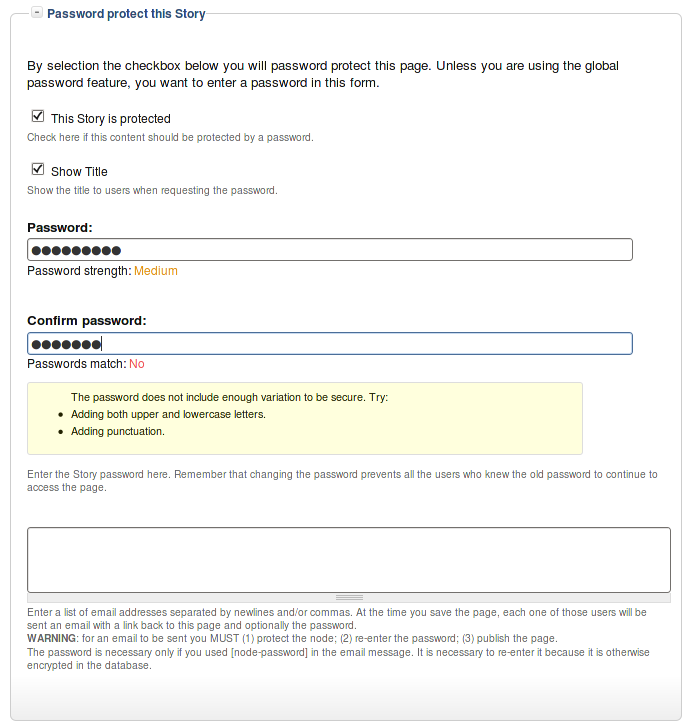 This field set includes two flags, a password, and emails (optional.)
By default, the field set is closed unless you selected protected by default. Whether the field set should be opened or closed can selected in the node type settings.
The <node type> is protected
The first check box is used to password
Protected Node Global Settings
The protected node module has global settings found under:
Administer » Site configuration » Protected node
Protected node Statistics
The page starts with statistics to let you know how pages are protected on your website. All the counts include published and unpublished content.
- Total nodes — the total number of nodes on your website
- Unprotected nodes — number of nodes that do not have a password
-
Protected nodes — number of nodes that are current protected by a password
- Showing title — number of nodes showing their ...
